Star Schema vs Snowflake Schema: Differences and Similarities

If you’re dealing with business intelligence, there are countless decisions you should make before your data appears in front of your desired target audience. From data sources to types of visualization, there’s so much a data scientist or a product manager needs to decide on. And to all that, add the choice of data warehouse modeling techniques.
The two most common choices are the star schema and the snowflake schema, and today, we’re going to show you a tutorial on how to make the right choice for your needs.
Star Schema vs Snowflake Schema: Quick Comparison
| Criterion | Star Schema | Snowflake Schema |
|---|---|---|
| Structure | Denormalized, flatter | Normalized, hierarchical |
| Design | Simpler, faster to set up | More complex — requires planning hierarchies |
| Query speed | Fewer joins, historically faster | More joins — though modern cloud warehouses narrow this gap |
| Storage | More redundancy | Less duplication |
| Updates | Harder — duplicated values need updating in multiple places | Easier — centralized, single-table updates |
| Debugging / lineage | Less obvious lineage | Easier to trace dependencies |
What is a star schema?
The star schema is the easier of the two to understand. At the center of the star is the fact table, which hosts numerical, quantitative data sets such as sales numbers, i.e. the hard data that is the basis for analysis. It is primarily used in data warehouses and OLAP apps.
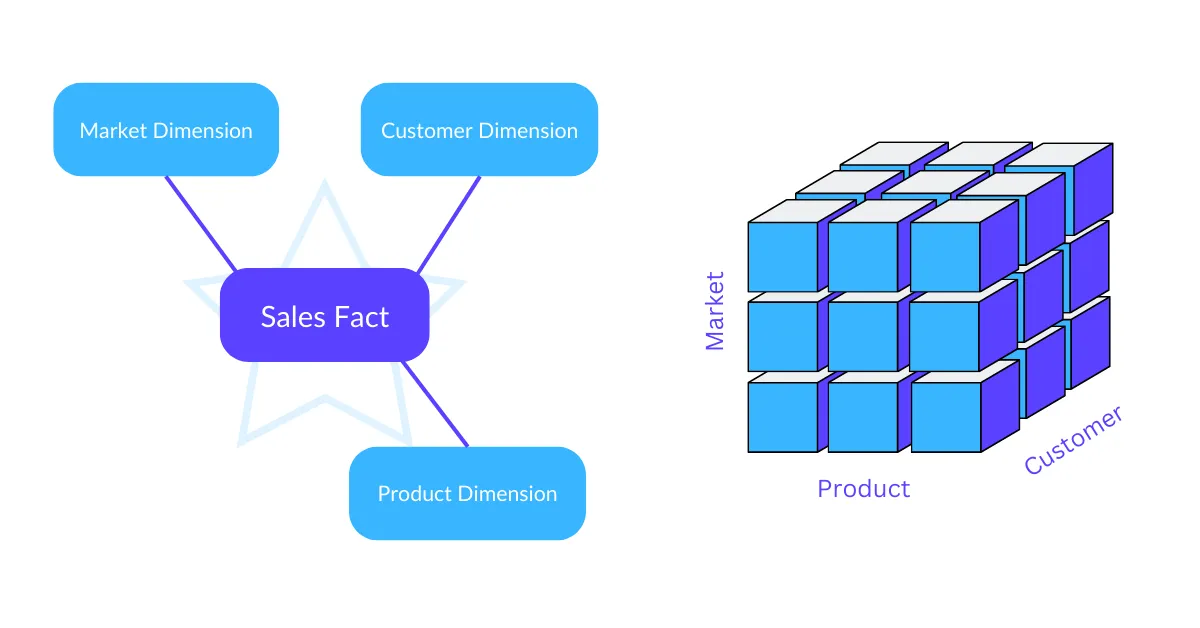
Around the central fact table are dimension tables. These are tables that provide additional context and details in relation to the main table. In the case of sales, dimension tables could contain data such as time, product or location.
The relationships between these tables are simple and often many-to-one. In other words, the fact table contains foreign keys that can be linked to the dimension tables’ primary keys. You can also import these schemas into Excel easily.
Dimension tables commonly have a more denormalized data structure, where data redundancy on certain dimension columns can and will happen. The extra data is there to improve the query performance by avoiding complex joins.
The star schema is simple to create and run and they’re best suited for those situations where query performance is the key consideration. Scalability is not a concern either because more data does not slow down integrity, efficiency or accuracy of your operations.
Example: retail data in a star schema
Take a retail business tracking sales. In a star schema, one fact table sits in the middle and every dimension hangs directly off it:
Fact table — Sales: order_id, product_id, customer_id, date_id, sales_amount, quantity
Dimension tables:
- Product —
product_id, name, category, brand - Customer —
customer_id, name, location, segment - Date —
date_id, day, month, quarter, year - Store —
store_id, name, city, region
Every dimension is one join away from the fact table. Category lives inside the Product table rather than in a table of its own.
What is a snowflake schema?
The snowflake schema is a more complex, advanced version of the star schema. The main difference between the two is that the data in the dimension tables is normalized, making for a more hierarchical structure with different levels of related tables. When visualized, these tables resemble the shape of a snowflake.
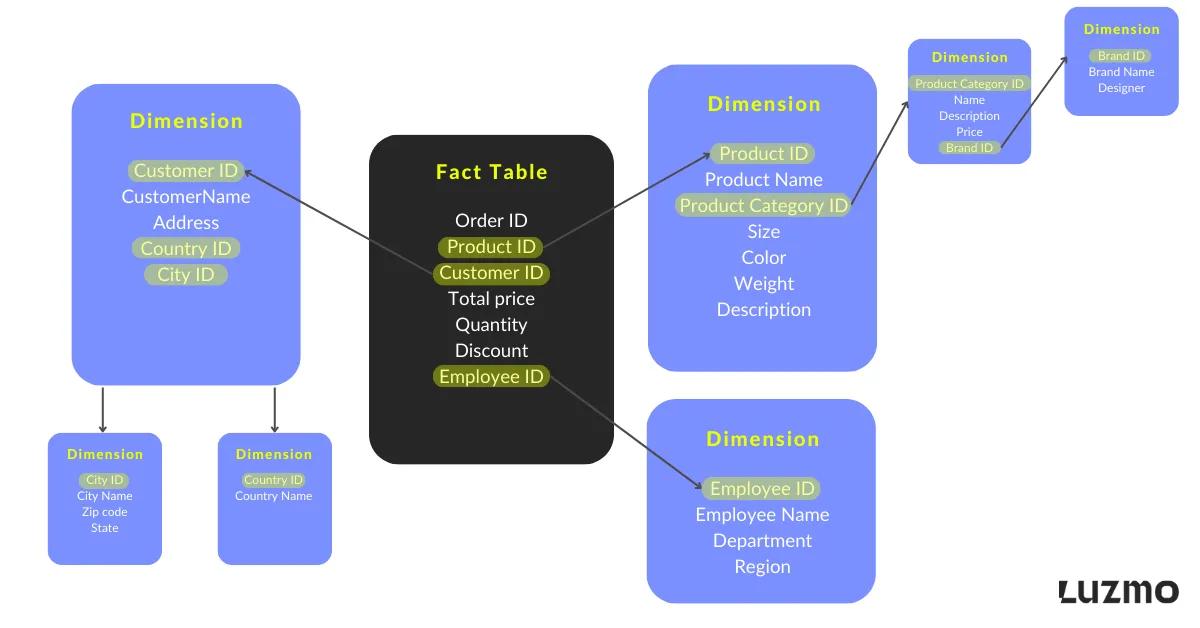
The reason is that the dimension tables have sub-dimensions that break down tables into related tables, resulting in a more normalized data structure. More sub-dimension tables means less data redundancy, and thus less space taken up in your data warehouse or data marts.
The relationships are typically more complex and instead of many-to-one, you might even have to deal with many-to-many relationships due to e.g. multidimensional hierarchies.
As there is an increased number of separate tables, this could affect query execution and performance. Typically, the query complexity is going to result in a longer query duration which is typically not desired for customer-facing analytics.
Last but not least, the schema design and management are more complex and that requires more hands-on work and management. Similarly, consuming such data models in a BI tool typically requires understanding it in depth, and knowing how and where to retrieve your desired insights from. A Snowflake schema thus often not really facilitates less technical users to create their own insights.
Example: the same retail data in a snowflake schema
The Sales fact table stays exactly as it was. What changes is that the dimensions are broken out into hierarchies of their own:
- Product → Sub-category → Category → Department
- Customer → City → Region → Country
- Date — stays relatively flat
- Store → Region → Country
Same business questions, same source data. Reaching a product's department now means walking three tables instead of reading one column — but a department rename happens in a single row rather than across every product that belongs to it.
Star schema vs snowflake schema: key differences
With all of that out of the way, here are the key differences between the two so you can have an easier time choosing something for your data warehousing needs.
1. Structure
A star schema has a centralized structure with fewer joins: one fact table, one ring of dimensions. A snowflake schema normalizes those dimensions into multiple levels, so the same information is spread across more tables.
2. Table relationships
Star schemas typically use one-to-many relationships that are easy to reason about. Snowflake schemas introduce chains of relationships between dimension and sub-dimension tables, which makes queries longer and harder to write by hand.
3. Ease of use
Star schemas are simpler and easier for non-specialists to consume, which matters if business users build their own reports. Snowflake schemas offer more flexibility but expect deeper knowledge of data engineering from whoever queries them.
4. Storage
A star schema can repeat entire descriptive hierarchies across many records — every row carrying its category, department and region as text. A snowflake schema stores each unique value once and references it, which means less duplication and potentially lower cloud storage costs at scale.
5. Updates
If a category name is duplicated across thousands of records in a denormalized star model, renaming it means updating many rows. In a normalized snowflake dimension, that update happens in one table. Snowflake has the edge wherever dimensions change frequently — which is also why it pairs naturally with slowly changing dimensions.
6. Debugging
A star schema can make lineage harder to trace, since many descriptive values live together in one wide table. A snowflake schema's explicit relationships make it easier to follow where a value came from — useful for compliance and data governance.
How cloud data warehouses change the trade-off
The traditional star-vs-snowflake trade-off hasn't disappeared, but cloud data warehouses have narrowed the performance gap that used to make star schemas the automatic choice for speed. Five capabilities do most of that work:
- Materialized views — precompute joins and aggregations ahead of query time
- Columnar storage — scan only the columns a query touches, not entire rows
- Caching — reuse the results of previous queries
- Query optimizers — rewrite the execution plan automatically
- Auto-scaling compute — add capacity on demand for heavier workloads
In practice, this means you no longer need to aggressively denormalize everything purely for speed. Star schemas still win on simplicity and dashboard responsiveness. Snowflake schemas get more attractive as data complexity, scale and hierarchy depth grow.
Which schema design should I use?
That depends on several factors. To make things simpler, here is when you should use a star schema:
- When simplicity and ease of use is your primary concern
- When query performance and speed are an utmost priority
- In analytical use cases when you need to do ad-hoc queries, create dashboards and reports
- When you don’t want to worry about maintenance overhead and complexity of your schema design
On the other hand, use the snowflake schema:
- Data redundancy in the star schema is a concern and when your business intelligence use case requires normalized data
- When having hierarchical data representation is crucial
- When you want to maintain data integrity at all times
- When you use complex data models where there are intricate relationships among data attributes
To sum up, for customer-facing analytics, the star schema makes more sense. It’s easier to understand and consume for users who are less technically literate, and it provides optimized query performance.
Last but not least, there is less maintenance overhead as the schema design is less complex.
While the snowflake schema has the benefit of avoiding data redundancy, this is a small consideration to make. The cost of storing this redundant data is in most cases significantly lower than the cost of running heavy, slow queries.
For most customer-facing analytics use cases, a star schema is the better default. The section below covers the cases where the answer is less binary.
Do you need to choose? Hybrid schemas
Most real-world data models mix both approaches rather than committing to a pure one:
Denormalize for speed. Frequently-used dimensions like Time, Product and Customer usually stay flat, because they are queried constantly and change rarely.
Normalize for flexibility. Hierarchical, high-cardinality or frequently-changing data — organizational structures, geographies, multi-brand hierarchies — benefits from normalization.
Combine the two. Modern cloud tooling lets you selectively flatten tables, build materialized views, and hide the remaining complexity behind a modeling layer.
For example, an e-commerce company might keep Time, Product and Customer flat so dashboards stay fast, while normalizing Location (Country → Region → City → Store) and employee hierarchies, because those change more often and benefit from centralized updates.
Wrapping up
In the end, the choice of your data warehouse schema boils down to your specific needs and requirements.
If your end goal is to visualize your key metrics in your SaaS app - we have great news.
At Luzmo, we specialize in modern data visualization tools for SaaS products like yours and we can advise you on what to choose and how to build it - even with artificial intelligence and machine learning involved. Luzmo starts at €1,995 per month, billed annually, with a platform fee plus adoption-based usage and no internal builder seat licences.
Book a free demo with our team and we’ll help you with more info!
FAQ
All your questions answered.
What is the difference between a star schema and a snowflake schema?
A star schema is denormalized, with a flatter structure and fewer joins, which makes it faster to query and simpler to design. A snowflake schema normalizes dimension tables into hierarchies, so there is less data duplication but more joins, which suits complex or frequently updated data.
When should you use a star schema?
When query speed and simplicity matter most. Ad-hoc analysis, dashboards, reports and customer-facing analytics all favour a star schema, especially when you want to keep maintenance complexity low and let less technical users build their own reports.
When is a snowflake schema better?
When data redundancy is a real cost, when you need to represent natural hierarchies, when data integrity matters more than query simplicity, or when you work with very large datasets whose dimensions change frequently.
Can you use a star schema and a snowflake schema together?
Yes, and hybrid models are common in practice. Many teams keep frequently-used dimensions flat for speed while normalizing complex, hierarchical or fast-changing dimensions for maintainability.
Written by

Ship the future of your data
Let us show you what Luzmo can do for your product.

Book your session with our analytics expert.