What is Embedded Analytics?
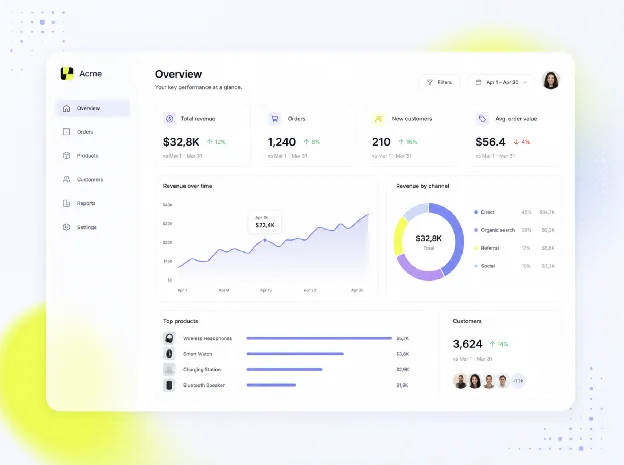
Embedded analytics is analytics functionality integrated directly into a software product for its end users, so customers can explore dashboards, reports and self-service data views inside the application where they already work. It differs from traditional business intelligence on one point that decides everything else: the audience is the software vendor's customers, not the vendor's own analysts.
Key takeaways
- Embedded analytics brings dashboards, reporting and data exploration directly into a software product for its end users.
- Embedded analytics and traditional BI differ in audience, environment, data scope, implementation and success metrics.
- The product-team question is build vs buy: multi-tenancy, permissions and performance are the hard part.
Luzmo, the embedded analytics platform for product teams, helps software companies add customer-facing analytics without building the full reporting foundation in-house.
How embedded analytics works
Embedded analytics brings data exploration into the product experience. It turns the data a platform already collects into dashboards, reports or interactive views that users can access without leaving the application.
The goal is not to expose every metric held in a data warehouse. It is to give each user the data that matters for their account, role and next decision. The experience needs to feel native to the product, respect permissions and work reliably across many tenants. That is the job of an embedded analytics platform: connect to the data, enforce tenant-aware access, and render dashboards that feel like part of the host product.
Embedded BI, short for embedded business intelligence, is a closely related term. In software products, embedded analytics and embedded BI are often used interchangeably when dashboards, reports and self-service data views appear inside a product.
What are embedded dashboards?
An embedded dashboard is a dashboard that appears inside a software product's own screens, in the product's own design, instead of in a separate analytics tool.
Luzmo's embedded dashboard editor lets users create dashboards through drag-and-drop interactions without coding or specialist training.
An embedded dashboard is one way to deliver embedded analytics, but the two aren't the same thing. A dashboard gives users a visual interface for monitoring and exploring data. Embedded analytics describes the broader capability behind it, including data access, permissions, filtering, reporting and, where supported, self-service exploration.
Dashboards are one common form of embedded analytics, alongside reports and self-service views, with permissions ensuring each customer sees only their own data. For the implementation process, see how to embed dashboards into a software product.
Two related capabilities are worth distinguishing:
Embedded reporting lets users access, filter, export or receive reports from within a software product. Some implementations also allow users to customize reports or build their own views, but reporting doesn't always require a self-service dashboard builder.
Embedded data visualization is the set of charts, filters and drill-downs a product shows its customers inside its own screens.
Benefits of embedded analytics for software product teams
Embedded analytics makes product value easier to understand, reduces manual reporting work and creates new ways to package capabilities for different customers.
Make product value visible
Many software products help customers improve a process, but the outcome is not always obvious from daily use alone. A dashboard can show saved time, campaign performance, operational trends or financial outcomes in a format customers can share with colleagues and decision-makers.
That does not turn every metric into a selling point. It gives users a clearer way to connect product activity with the results they need to explain. A customer who can see a meaningful trend or measurable improvement has more evidence of what the product contributes to their work.
Support product engagement
A useful analytics experience gives customers a practical reason to return to the product. Users can investigate a change, compare performance over time or share findings with teammates in the same place where they already complete work.
The aim is to place insight close to action. When customers can see an issue and act on it in one workflow, analytics becomes part of the product experience instead of a separate reporting task.
Create premium package options
Basic reporting may belong in the standard product. More advanced capabilities, such as configurable dashboards, self-service exploration or white-label editing, can become part of a premium plan or add-on when customers value that level of control. Packaging reporting this way is one way teams can monetize embedded analytics.
This gives product teams a way to test what users will pay for without withholding the visibility customers need to understand the product's value.
For what embedded analytics costs, see embedded analytics pricing.
Reduce build work
Building analytics in-house involves more than rendering charts. Teams need data isolation, permissions, query performance, responsive design, dashboard configuration and ongoing maintenance. Each of these responsibilities adds development time that could otherwise go toward the core product.
Lansweeper, an IT asset management software company, chose Luzmo instead of continuing to build its own reporting capabilities. Its CPO, Maarten Saeys, says the company skipped three years of development time by taking that route.
Spaceflow, a property-tech company, replaced standalone Tableau dashboards with embedded analytics in its landlord portal. Working with its Data & Analytics Manager, Eva Lisonova, the company cut generic analytics requests by 80%.
Both examples reflect a practical reason to adopt embedded analytics: product teams can make information available to customers without owning every part of the reporting experience themselves.
Embedded analytics vs traditional BI
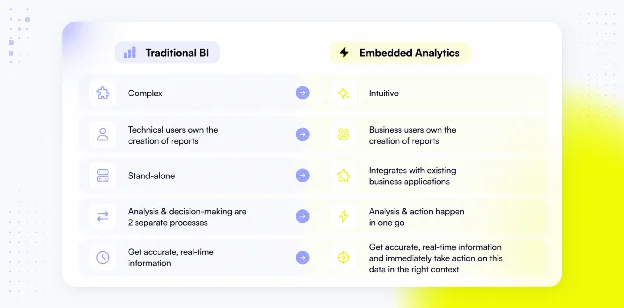
Embedded analytics and traditional BI can use the same underlying data, but they serve different people, solve different jobs and need different success metrics.
| Dimension | Embedded analytics | Traditional BI |
|---|---|---|
| Audience | A product's end users (customers) | Internal teams: analysts, finance, operations, leadership |
| Environment | Inside the host product, beside the workflow | A separate reporting tool users open on demand |
| Data scope and permissions | Tenant-aware, role-based; each customer sees only their data | Shared company-wide data models |
| Implementation | Product and engineering integrate an analytics layer (SDK, web components, iframe) | Analysts and data teams configure reports in a BI tool |
| Success metric | Product users understand and act on their own data | Internal teams reach sound business decisions |
Audience
Traditional BI is mainly built for internal teams, including analysts, finance, operations and leadership. Those users may need broad access to company data and detailed analysis across departments.
Embedded analytics is built for a product's end users. It gives customers access to information relevant to their own account, role or workflow, the defining trait of customer-facing analytics. The experience has to work for people who do not spend their day in an analytics tool.
Environment
Traditional BI commonly lives in a separate reporting environment that users open when they need analysis.
Embedded analytics lives inside the host product. A dashboard can appear beside the workflow it supports, so users do not need to switch context to understand what is happening.
Data scope and permissions
Internal BI can work across shared company data models. Embedded analytics needs tenant-aware filtering and role-based access so each customer sees only the data they are allowed to access.
Multi-tenancy is easier to manage when it is part of the analytics architecture from the start. Retrofitting tenant isolation later can add complexity around permissions, data filtering and testing.
Implementation and ownership
Internal BI implementations often center on analysts and data teams configuring reports in a BI environment. Embedded analytics needs product and engineering teams to integrate an analytics layer into the application, align it with authentication and connect it to the product's data model.
SDKs, web components and iframe-based embedding can suit different requirements. The key test is whether the final experience feels responsive, secure and connected to the parent product.
Success metric
Traditional BI succeeds when internal teams can explore the business and reach sound decisions. Embedded analytics succeeds when product users can understand their own data, act on it and get more value from the software.
Why the embedded analytics market is growing
Users increasingly expect relevant data inside the software they pay for. A static export or monthly report is often too slow for questions that arise during day-to-day work.
The technical side is changing too. Product teams are expected to support secure access, responsive interfaces, self-service controls and tenant-specific data at scale. A reusable analytics platform can reduce the foundation work needed before a team can test a useful reporting experience.
For software companies, embedded analytics offers a way to introduce customer-facing reporting without treating every dashboard as a separate custom-development project.
Methods of embedding analytics
There are three main ways to embed analytics in a product, and the choice shapes how native the experience feels and how much your team owns. For definitions of the technical terms, see the embedded analytics glossary.
Native components
Native components, such as SDKs and web components, integrate analytics into the product interface. They allow teams to coordinate the dashboard's appearance and behavior with the surrounding application, including styling, layout and user interactions.
This approach is useful when analytics needs to feel like a natural part of the application rather than a separate reporting destination. Teams can align navigation and visual design with the rest of the product while managing authentication and user context through the integration.
Native embedding does not remove the need to test permissions, responsiveness and tenant isolation. Those requirements still depend on the underlying analytics platform and the way the application integrates with it.
iframe embedding
An iframe displays analytics content within a separate browser frame. It can be a practical way to introduce dashboards without building a custom rendering layer.
Unlike components rendered directly within the parent application, iframe content has its own document context. That can require additional work to coordinate styling, authentication and communication with the host application.
However, iframe embedding is not inherently a poor user experience or an insecure implementation. A well-integrated iframe can be suitable for production applications when it meets the product's requirements for design, user context and tenant-aware access.
The choice should depend on the integration experience your users need and the technical work your engineers can support.
For a closer look at the differences, see iframe vs web component.
Luzmo supports iframe and web-component embedding, with SDKs available for React, Vue and Angular. Its embedded analytics offering also includes white-label customization.
API or headless embedding
An API or headless approach separates the analytics capabilities from the interface customers use to interact with them.
Instead of relying on a prebuilt dashboard interface, a product team can use APIs to connect analytics functionality with its own application components. This approach gives developers greater control over the user experience, but also means more responsibility for implementation and maintenance.
It can suit products with highly specific interface requirements or engineering teams that already have reusable visualization components.
The trade-off is straightforward: greater flexibility usually requires more development work. Teams need to consider the cost of creating, maintaining and testing the resulting experience.
The embedding method is one decision inside a larger system. Our guide to analytics platform architecture covers how rendering fits alongside identity, tenant context, product integration and production scale.
For the practical sequence, see our walkthrough of how to embed dashboards in a software product.
The 5 key features of good embedded analytics tools
Product teams need more than a chart library. The right platform should support the customer experience while handling the technical work behind it.
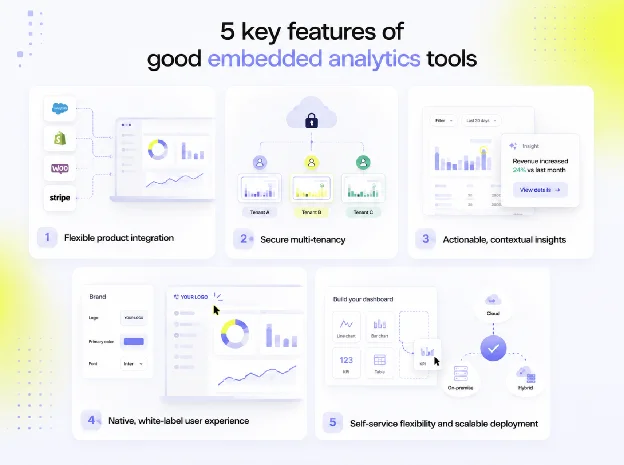
Use the following areas as part of a wider embedded analytics tools evaluation.
1. Flexible product integration
The analytics layer should fit the product's frontend, authentication model and data sources. Teams need integration options that work with their architecture and leave room for custom connections, reusable components and future product changes.
A strong fit also means analytics can appear where it makes sense in the workflow instead of being confined to one reporting page.
2. Secure multi-tenancy
Each customer should see only the data they are allowed to access. Look for tenant-aware filtering, role-based access, secure authentication flows and controls that fit the product's broader security model.
This matters more as the product serves more accounts, roles and regions. The analytics experience has to remain safe and reliable at every level.
Tenant isolation also needs to hold when users interact with the data, change filters or request exports. Access controls should apply consistently across the experience rather than only when a dashboard first loads.
3. Actionable, contextual insights
A dashboard is more useful when it appears where a user can act on the information. A low-inventory view in an operations product has more value when it leads directly to a reorder workflow. A retention trend in a customer-success product has more value when the team can investigate the account immediately.
The aim is to connect insight with the next action inside one product flow.
4. Native, white-label user experience
Analytics should look and feel like part of the product. That includes branding, layout, language, time zone and responsive behavior.
White-label control helps dashboards match the product's visual system and user journey. It matters when analytics should feel like a first-class product capability instead of a separate vendor tool. See how white-label embedded analytics works in practice.
The result should be an interface customers recognize. They should not need to learn an unrelated reporting environment to understand the data generated by the software they already use.
5. Self-service flexibility and scalable deployment
Different users need different levels of control. Some only need a clear dashboard. Others need filters, saved views or the ability to create their own reports.
The platform should let product teams decide where to draw that line. A standard experience can serve most users, while deeper self-service can support power users or premium plans.
It should also give teams a repeatable way to expand analytics across accounts without rebuilding the same foundations each time.
Embedded analytics examples
Embedded analytics looks different in every product, but the pattern is always the same: each customer sees the data relevant to their own account, inside the workflow where they act on it.
The value is not the chart itself but the decision it shortens. The following scenarios are illustrations, not customer case studies.
Logistics: delivery performance
A logistics platform shows each customer delivery performance across their own sites, including on-time rates, exceptions by lane and carrier trends.
An operations lead can spot a problem lane and investigate it inside the same platform used to manage deliveries, without exporting information to a spreadsheet.
Project management: budget and resource trends
A project-management product surfaces budget burn and resource allocation in the same place teams plan work.
A project lead can see a budget trending over, understand why and rebalance the plan without switching to a separate reporting environment.
Marketing: campaign results
A marketing platform gives customers campaign results alongside the tools they use to build the next campaign.
A marketer can review what worked and apply the findings to the next send rather than waiting for a separate report.
For more worked examples across industries, see embedded analytics examples.
The free trial lasts 10 days.
Is your product ready for embedded analytics?
A product does not need a perfect data model or a fully formed analytics strategy before it starts: it needs a clear first use case.
The best place to begin is often a recurring customer question that support, customer success or account teams answer manually. It may be a report users request each month, an outcome they struggle to prove or a decision they cannot make with the information currently available.
Before choosing a platform or starting an internal build, product teams should be able to answer:
- Which users need analytics first? Identify the customer roles most likely to benefit from the initial reporting experience.
- What decision should the experience help them make? Define the recurring question the dashboard or report needs to answer.
- Which data can each customer safely access? Establish tenant boundaries and confirm that the required data is available.
- How will permissions work across roles and accounts? Decide what each user can view, explore or change.
- Does the product need basic dashboards, self-service reporting or configurable views? Determine how much flexibility the first release requires.
- Is the team ready to maintain its own analytics platform as part of the core product roadmap? Consider the ongoing development, security and maintenance responsibilities.
The build-versus-buy decision becomes clearer once those answers are in place. An in-house route can make sense when analytics is a deep strategic capability and the team is prepared to own the supporting platform.
An embedded platform can make more sense when the priority is to ship customer-facing analytics sooner while engineering remains focused on the differentiated product experience.
For workflow-specific applications, see embedded analytics use cases.
Build a better analytics experience inside your product
Embedded analytics gives software companies a way to make data useful inside the product, where customers can understand it and act on it.
Start with one user group and one recurring decision. Give users enough visibility to understand the value they get from the software, then expand the experience as needs become clearer.
Book a demo to see how Luzmo can help you deliver analytics that fits your product, users and data model.
FAQ
All your questions answered.
What is embedded analytics?
Embedded analytics is analytics functionality integrated directly into a software product for its end users. It can include dashboards, reports, visualizations, filters and self-service data views inside the product where users already work.
How is embedded analytics different from traditional BI?
Traditional BI helps internal teams analyze company-wide information and make internal decisions. Embedded analytics gives product users the data, controls and context relevant to their own account, role or workflow.
What is embedded business intelligence?
Embedded business intelligence, or embedded BI, refers to BI capabilities delivered inside another application. In software products, it is often used interchangeably with embedded analytics when customers access dashboards, reports and self-service data views inside the product.
How does embedded analytics work technically?
An embedded analytics platform connects to data sources, processes queries and renders results inside a host application. Product teams integrate it using an approach that fits their architecture, while the platform can handle areas such as tenant-aware access, dashboard delivery and query performance. The host application and analytics layer need to work together to pass the correct user context and enforce permissions, particularly when the product serves multiple customers.
What does a software product need before adding embedded analytics?
A software product needs a clear first use case, data that can be shared safely and a way to manage roles, permissions and tenant boundaries. The team should also understand whether users need simple dashboards, deeper exploration or configurable reporting, and whether the product will build or buy the analytics functionality.
What is an example of embedded analytics?
A logistics platform showing each customer their own delivery performance across sites is embedded analytics. Other examples include a project-management tool surfacing budget and resource trends, or a marketing platform showing campaign results inside the app. In each case, users can explore relevant information without moving to a separate business intelligence application.
What are the 4 types of analytics?
The four types are descriptive analytics (what happened?), diagnostic analytics (why did it happen?), predictive analytics (what is likely to happen next?) and prescriptive analytics (what should we do about it?). As a category, embedded analytics can deliver any of them inside a product for its end users.
Written by

Ship the future of your data
Let us show you what Luzmo can do for your product.

Book your session with our analytics expert.