Product Release Update – May 2026
Good stuff this month: a built-in way to test your embedded AI Analyst, one of the most-requested Studio features, recurring chart exports, and more. Let's get into it.
Luzmo Analyst is now your home page
The Analyst tab just got promoted. It's now the top item in your navigation and the first thing you see after login, and there's a good reason for that.
If you're building an embedded AI Analyst experience for your users with Luzmo IQ, you've probably wondered at some point: "But what will this actually feel like for them?" Now you can just... find out.
Open the Analyst tab, point it at your existing datasets, start asking questions, and see exactly the kind of answers your users will get. No extra setup, no sandbox to configure, no additional cost until the end of June.
It's a bit like having a test drive mode built right into the app. The responses come back in both text and chart form (so you're seeing the full picture), and you can save anything useful straight to a new or existing dashboard as you go.
A couple of things worth knowing:
- Answers come back in both text and chart form, so you can evaluate the full output your users would see.
- You can save charts directly to a new or existing dashboard.
Once you've validated the experience and you're ready to ship it to your users, reach out to your CSM or simply email us at hello@luzmo.com to get the embedded AI Analyst enabled in your application.
Copy charts to other dashboards in Luzmo Studio
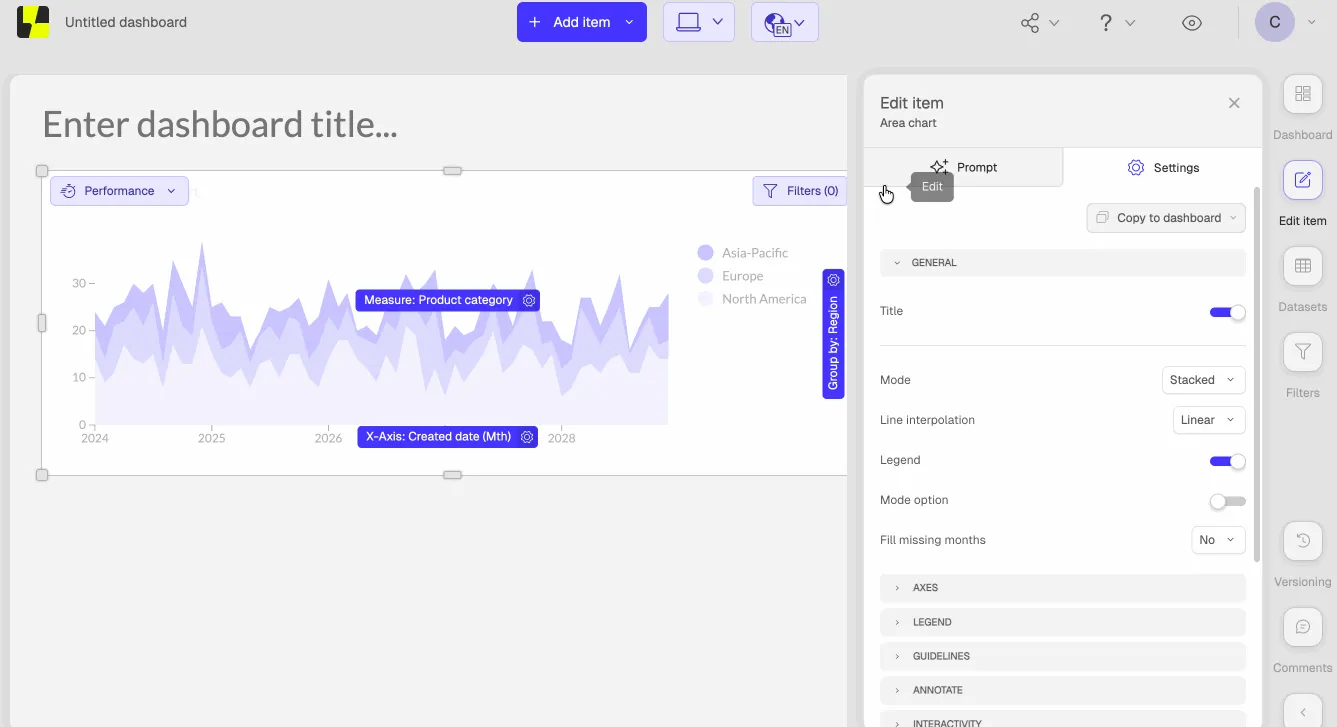
This one's been at the top of the Studio wishlist for a while, and it's finally here. You can now copy any chart to another dashboard (or a brand new one) directly from the Edit Item panel. No rebuilding from scratch, no workarounds.
The dashboard picker has search built in and sorts by most recently updated, so finding the right destination is fast. If you're copying to a dashboard with unsynced screenmodes, there's a quick selection step to make sure everything lands correctly. A success banner with a direct link confirms where your chart ended up.
You can find it under Edit item > Settings > "Copy to dashboard."
Schedule recurring email exports on a single chart
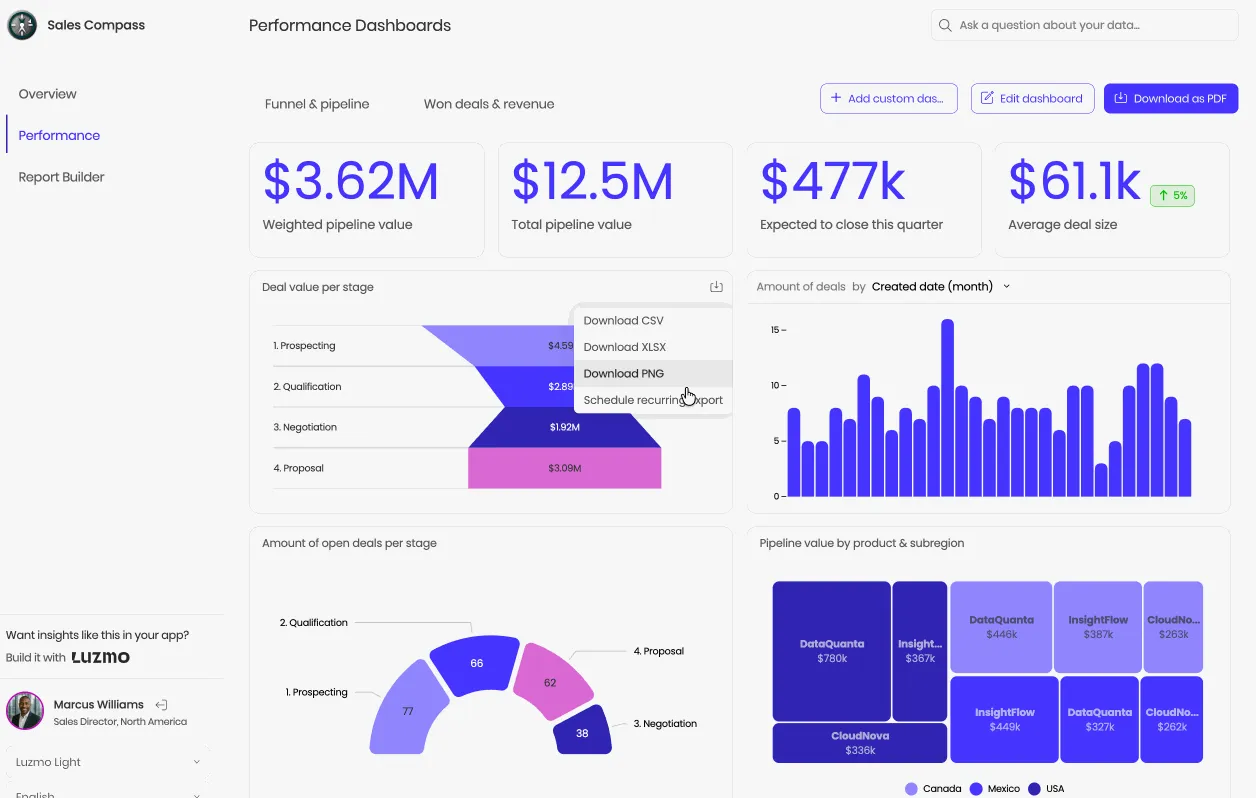
Your end users can now set up recurring email exports directly on individual charts, not just full dashboards. CSV for raw data, PNG or PDF for the visual. Configurable start date, time, and frequency, with an optional custom email subject and body if white labeling is enabled.
It's a natural upgrade to something your users were probably already doing manually. Find it by opening any chart, clicking the export icon (top right), and selecting "Schedule recurring export." Managing or stopping existing schedules is just as easy, with a dedicated entry point right on the chart.
LLM resources for AI-powered development

We've added a new LLM resources section to our developer docs, and it's worth bookmarking if your team is using AI coding tools in your workflow.
To be clear: this isn't a new product feature. It's structured, LLM-ready documentation that makes it much easier to use Luzmo alongside tools like Cursor or Copilot.
Think faster prototyping with the Flex SDK, smoother AI-assisted implementations, and the ability to set up things like your own AI Slack agent on top of your Luzmo data, without manually piecing together context from across our docs every time.
If you've ever wished your AI coding assistant just "got" Luzmo better, this is for you.
Warp improvements: more resilient delta syncs

Our built-in data acceleration layer, Warp, can now detect safe schema changes (think: newly added columns, modified non-tracking fields) and handle them automatically. The next scheduled sync triggers a full reload, the dataset gets back to a healthy state, and nobody has to intervene. It just sorts itself out.
Worth noting: changes to primary keys, timestamp fields, or other tracking columns still require a manual review. That's by design, those are the changes where getting it wrong would cause incorrect sync behavior, so we're not going to auto-recover from those.
We've also shipped throttling, logging, and metrics alongside this, so you get better visibility into when auto-recoveries happen and nothing spirals into uncontrolled reloads if your schema is going through a lot of changes at once.
We also shipped a few other things you'll love
Last (x) completed periods filter: On popular request! The "last completed period" filter now lets you configure the number of periods. Find it as "last (x) completed (periods)" in your filter settings.
Native DuckDB connector: Luzmo now connects natively to DuckDB. You'll need the httpserver extension enabled to connect. Full setup guide in Academy.
New SPLIT_PART() operator: Split a string on a delimiter and return the Nth match, right in your formula expressions. Same syntax as Trino or Postgres, and a much cleaner alternative to nested STRPOS/SUBSTR chains. For example, SPLIT_PART('Sweet burrito', ' ', 2) returns burrito.
Get started with these new features
Ready to put these updates to work? Head to your Luzmo dashboards and start exploring today.
Questions or feedback?
Reach out to your CSM or drop us a line at hello@luzmo.com. We’d love to hear how these updates improve your workflows.
Written by

Ship the future of your data
Let us show you what Luzmo can do for your product.

Book your session with our analytics expert.