Looker vs Domo: Which is Better for BI Analytics In 2026?
Editor’s note: In July 2026, Domo announced that its AI and data platform business is set to be acquired by Progress Software. The transaction has not yet closed. As this may affect Domo’s pricing, product roadmap, and services, some information in this article may change. We’ll update the article as further details become available.
When looking at business intelligence tools designed for enterprise audiences, two tools often come to mind: Looker and Domo. Both can be used for everything from simple dashboards to advanced data modeling and analysis.
If you’re considering which of the two is better, has more affordable pricing or better connectors, we’re here to help. Today, we take a look at these two cloud-based BI tools to learn which one is the more sensible choice.
| Criterion | Looker | Domo | Winner |
|---|---|---|---|
| Data visualizations | Wide range, flexible customization (often needs a Looker developer) | 150+ visualization types but weaker customization | Looker |
| Ease of use | Simple on the surface, but real use needs LookML, data modeling, APIs | Simple for basics, frustrating for advanced analytics | Roughly equal |
| Data sources & integrations | 60+ tools/platforms | 1,000+ connectors | Domo |
| Performance | Strong once Explore/LookML is set up correctly, including embedding | Fine for smaller datasets, slower on large ones | Looker |
| Pricing | ~$60K/year starting point + roles/users | $20K–100K+/year, credit/usage-based | Both enterprise-priced |
The basics
Looker is a data exploration and discovery platform founded in 2012. In 2019, it was purchased by Google. It’s important to differentiate it from Looker Studio (formerly known as Google Data Studio), which is Google’s free offering for marketing reporting.
Domo is a full-stack cloud-based business intelligence tool, offering every functionality a modern data team may need. User-friendly interface, powerful data integrations, ETL capabilities, drag-and-drop dashboard builder: Domo packs a mighty punch.
Data visualizations
If you want to get tailored insights out of your data quickly, Domo can be a bit of a letdown. Although it has a wide range of visualization choices (150+), the lack of variety is not what the Domo user base complains about.
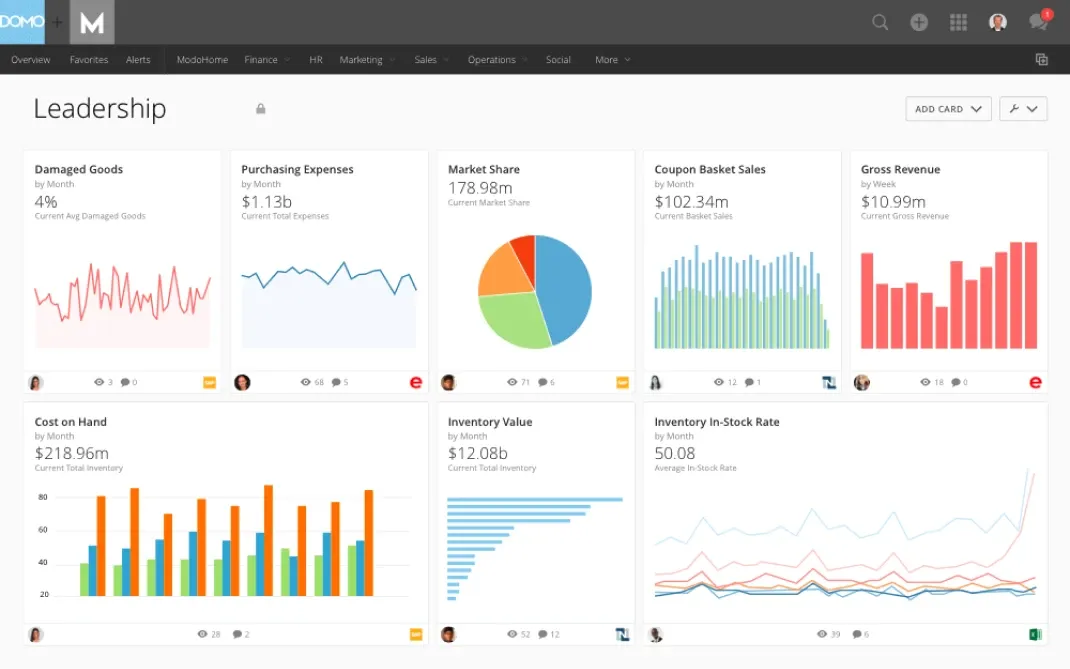
The major issue is the level of customization: getting your metrics and KPIs to show up just the way you want them will require quite a bit of work.
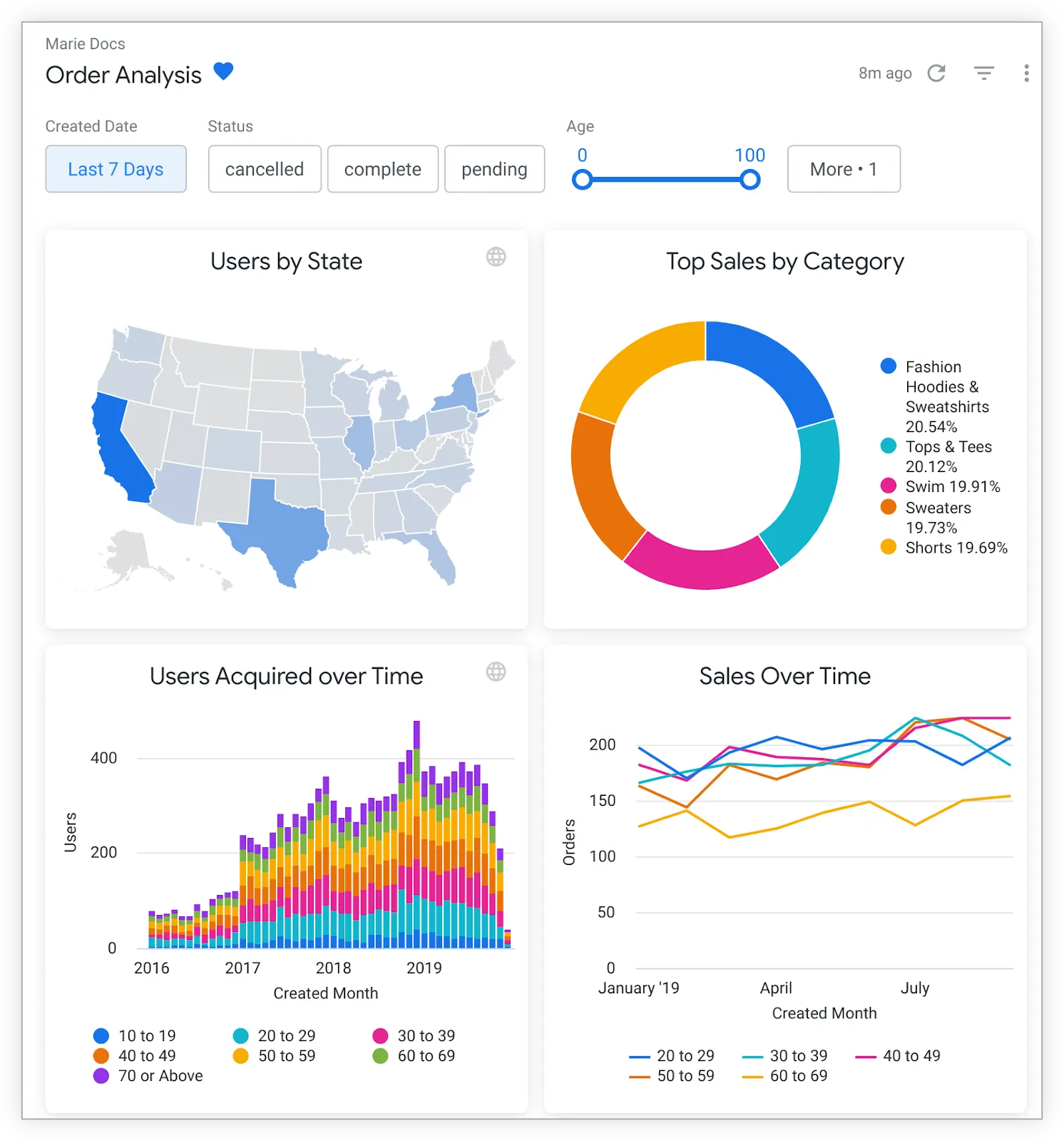
Looker visualizations, according to user reviews, are much different. There is a massive choice of supported visualization types and customization is very easy. Business users can make adjustments to pre-built templates or create their own without breaking a sweat. However, having a Looker developer on standby can help if you want to make those data-driven decisions faster.
Winner: Looker — for teams that can invest in a Looker developer.
The ease of use
The two tools score pretty evenly on this front. Looker seems very simple from the start, but in reality, you really need someone who is handy with data management, preparation, APIs, modeling and visualizations to get the most out of this tool.
Creating any kind of workflow requires knowledge of LookML, which is completely different from something like SQL. This can be a hurdle for startups, as you most likely need to hire a Looker expert to achieve real ROI from this platform.
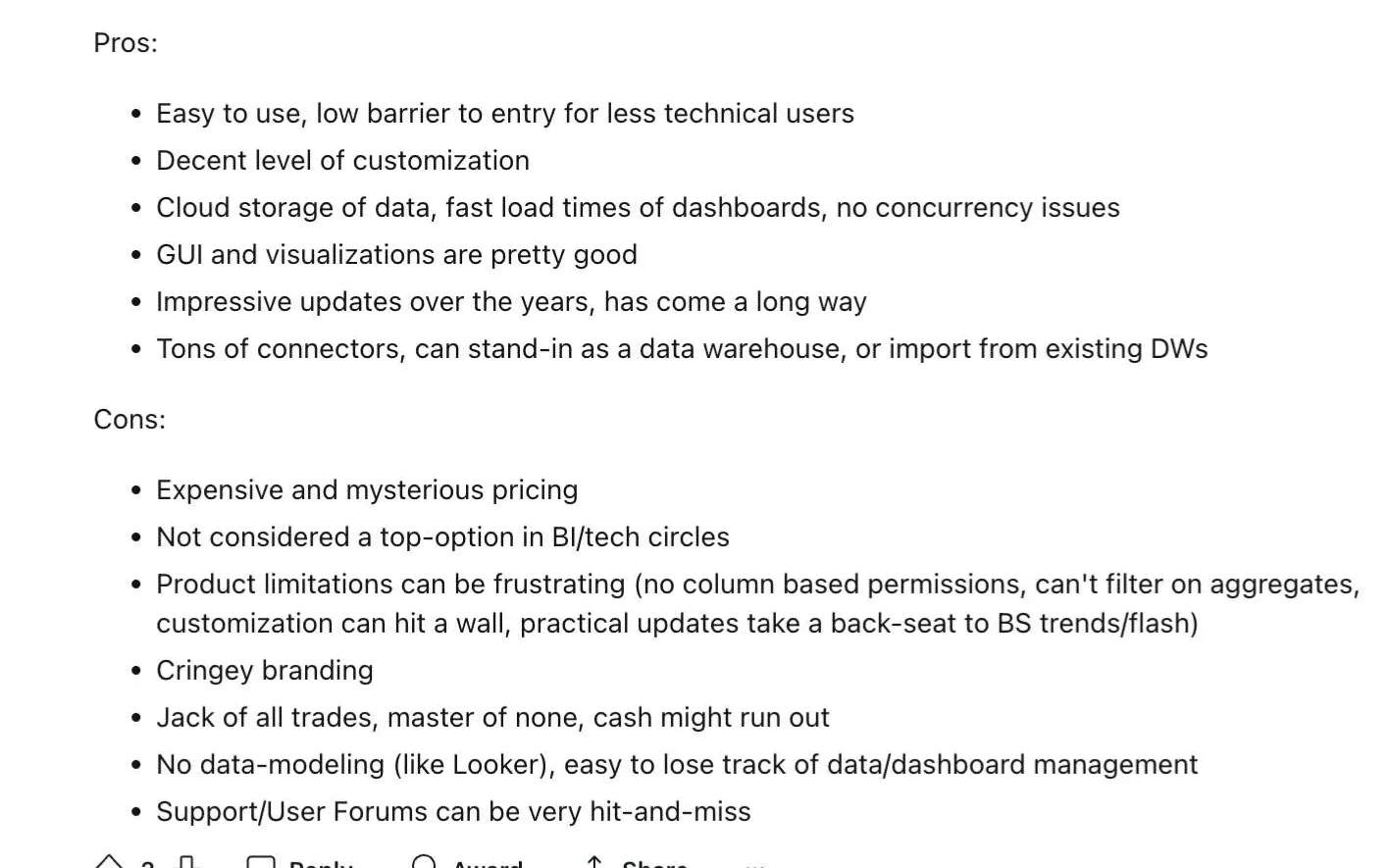
When it comes to the ease of use, Domo reviews are mixed. Some customers state that for the less technically inclined users, Domo is an excellent choice since it does not take much to get the tool up and running.
Others state that for more advanced use cases, Domo is difficult to use because it does not have data modeling. Ironically, this means it’s more difficult to use if you have an advanced use case.
Winner: Roughly equal — Looker’s simplicity is surface-level; Domo’s breaks down at advanced use cases.
Data sources and integrations
Looker performs really well with native Google Cloud integrations, but it does not end there. It integrates with over 60 different tools and platforms, such as HubSpot, MailChimp, Xero, Quickbooks, Slack and others. However, it pales in comparison to Domo.
Domo reigns supreme in this category. Compared to other enterprise-elvel tools like Microsoft’s Power BI or Salesforce’s Tableau, it’s worlds apart. At the moment of writing, there are over 1,000 different connectors to meet your specific needs. Data warehouse, business tool, data pipelines and more.
Winner: Domo — more than 15x the connector count.
The performance
In general, Looker performance is very admirable. Provided that you set up the explore functionality well from the start, having solid knowledge of LookML and your favorite database, you can expect lightning-fast performance. There is a bit of a steep learning curve to master these key features, so it’s advisable for non-technical users to find some outsourced help.
Looker for embedded analytics is exceptionally fast, but the setup is time-consuming and it can be very costly with a large number of end-users.
In terms of performance, Domo is a hit or miss. If your datasets aren’t large and you only create the most basic of dashboards, they will load fairly quickly. However, if you have large datasets, it can take a good amount of time for it to fetch in the dashboard. For on-premise data analysis and visualization, this may not be a problem.
However, if you want to use Domo for embedded analytics, this can be an issue. End-users and stakeholders will expect app-like performance. Most Domo competitors perform better in this area.
Winner: Looker — once properly configured, including for embedding.
Domo vs Looker: pricing
One thing these tools have in common is how cryptic their pricing is.
We’ve recently discussed Domo pricing and it boils down to the three main plans with fairly similar features. The main difference is the self-service help in the cheaper plans compared to proper account managers when you pay for one of the more expensive plans.
The pricing is based on usage. In other words, every action on this BI platform (whether it’s your team or your end-users) costs a certain amount of credits. You pay that on top of your account fees, as well as a $750 license fee for every user in Domo.
That all boils down to this: you’re going to pay anywhere from $20,000 to $100,000 (and more) annually for Domo.
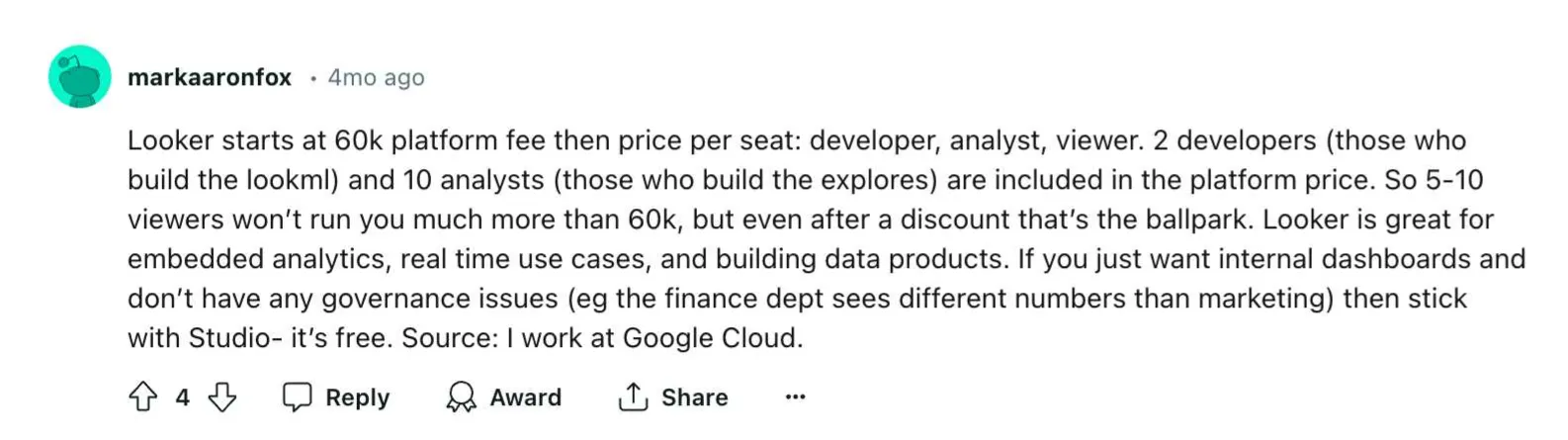
Looker, on the other hand, starts at $60,000 annually. This gets you basic access to the platform, and you’ll have to pay extra for every role on your team: developers, analysts, viewers. While Looker is excellent for real-time decision-making, the price point makes it prohibitive for smaller teams with lower budgets.
Looker and Domo for BI analytics comparison conclusion
Which is the better of the two data analytics tools? Looker has stronger visualizations. In terms of ease of use, they land roughly on the same level. For data sources and integrations, Domo takes the cake. Performance is where Looker shines. And pricing? Both tools can easily move you into the six-figure range.
But if you’re searching for a platform built for embedded analytics, neither Looker nor Domo is a great fit. They’re expensive, difficult to embed, and their long loading times make the experience feel heavy, especially inside a customer-facing product.
This is where Luzmo comes in.
With Luzmo Studio, your team can design dashboards that feel native to your product. With Luzmo Flex, your developers can use analytics as individual UI components instead of full dashboards. And with Luzmo IQ, your end-users get AI-powered insights directly in their workflow without digging through layers of reports.
Luzmo’s pricing is transparent and built for SaaS growth. Luzmo starts at €1,995 per month, billed annually, with a platform fee plus adoption-based usage and no internal builder seat licences.
Give your software the embedded analytics platform it deserves. Start a free trial of Luzmo and see how your customers can enjoy fast, self-service analytics that actually helps them make better decisions.
FAQ
All your questions answered.
What is the main difference between Looker and Domo?
Looker focuses heavily on governed data modeling through its LookML language and strong integration with the Google Cloud ecosystem. Domo, on the other hand, positions itself as a full-stack cloud BI platform with extensive integrations and built-in ETL capabilities, allowing teams to connect many different data sources quickly.
Which platform is easier for business users to work with?
Both platforms can require technical expertise depending on the use case. Looker often requires knowledge of LookML and data modeling to unlock its full capabilities, while Domo may be easier to start with for simple dashboards but can become complex for advanced analytics workflows.
Why are Looker and Domo considered expensive BI tools?
Both platforms typically rely on enterprise-style pricing models. Looker’s pricing can start around tens of thousands of dollars annually depending on user roles and usage, while Domo charges based on platform access and credit-based usage, which can quickly increase costs as teams and workloads grow.
What makes Domo’s approach to BI unique compared to Looker’s?
Domo’s strength lies in being a full-stack, cloud BI platform that supports rapid connectivity, built-in ETL and extensive integrations. Looker’s focus is more on governed modeling and tailored analytics through its semantic layer. If you want speed in integrating many systems, Domo aligns; if you prioritise disciplined data architecture, Looker’s approach may suit better.
How do Domo and Looker support data science efforts?
Domo offers accessible tools for business users to run simpler predictive tasks and alerts, whereas Looker empowers data scientists via SQL/LookML modelling and custom visualisation of complex metrics. Whichever you choose, ensure the platform facilitates your data science workflows rather than hinders them.
Can both platforms provide real-time alerting when metrics deviate?
Yes, Domo emphasises real-time dashboards and notifications from many sources, while Looker also supports alerts but often relies on proper model setup and queries for accuracy. If alerts are a core requirement, check how quickly each platform handles event streaming into your custom dashboards.
How do Domo’s and Looker’s capabilities differ in terms of data access, pipelines and chart types?
Domo offers expansive data connectors and supports complex data pipelines, allowing broad data access out of the box, though visual flexibility may be limited. Looker emphasises the ability to ajdust many customizable chart types and shape analytics deeply, but often demands stronger data / modelling skills and infrastructure to set up.
For a SaaS company aiming to embed data analytics and visualization apps, which is preferable: Domo or Looker?
For a SaaS-centric business, the choice comes down to whether you want a more turnkey experience or a more custom, model-driven solution. Domo’s “ready to go” nature supports teams who want to embed dashboards and build lightweight data apps quickly. Looker’s strength lies in structured modelling for scalable, governed embedded analytics. Your final decision should hinge on scale, customisation needs, and developer resources.
Written by

Ship the future of your data
Let us show you what Luzmo can do for your product.

Book your session with our analytics expert.