What is a Correlation Chart and When Should You Use it?
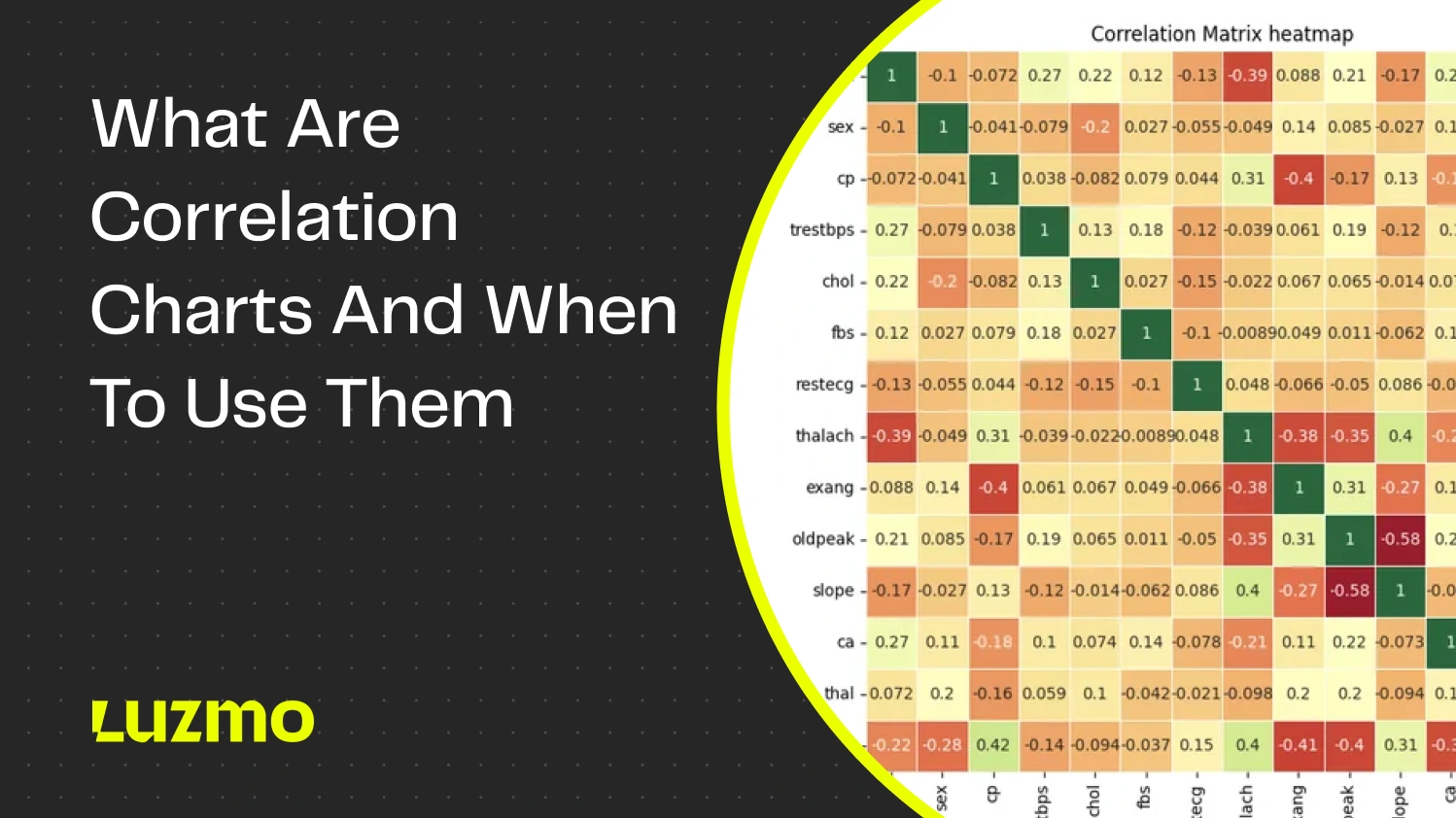
A correlation chart is one of the best ways to show the correlation between multiple variables or data points without sacrificing considerable space in your dashboard or report. You’ve probably seen it in Microsoft Excel, but it’s also used in modern business intelligence tools to illustrate correlation and causation.
Today, we’ll show you what correlation charts are and when and how (not) to use them for data visualization.
What is a correlation chart?
A correlation chart or a correlation matrix is a chart type in data analysis used to show the relationship between multiple variables. It shows how strongly or weakly two variables are related, using a number from -1 to 1.
1 indicates that there is a perfect positive correlation (when one variable increases, the other one increases too)
0 indicates that there is no correlation at all
-1 indicates a perfect negative correlation (as one variable increases, the other one decreases)
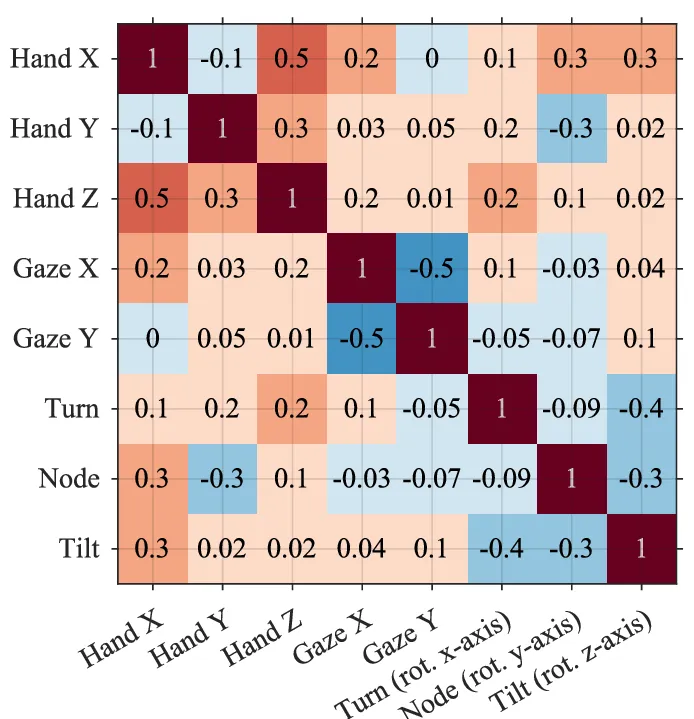
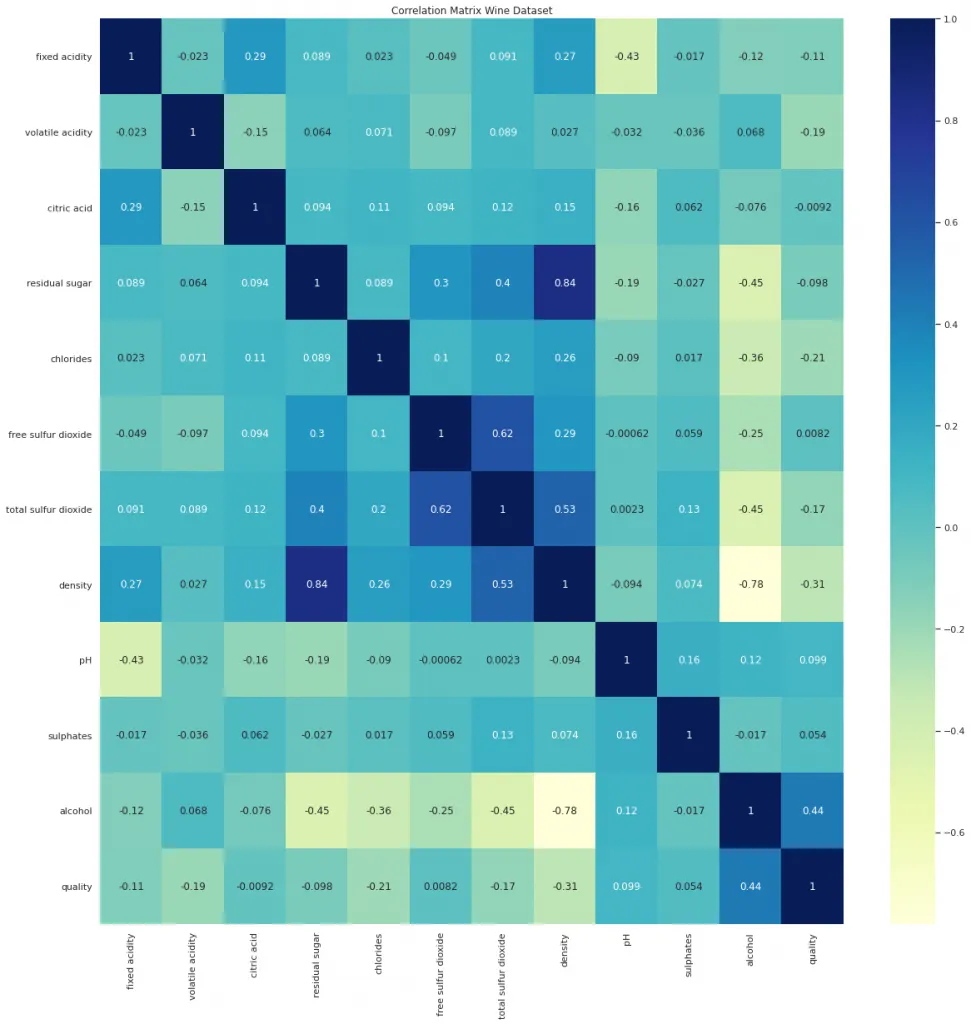
In a correlation chart, the data is typically displayed in a matrix or grid form and each cell shows the correlation coefficient between two variables. You can also use color gradients or circles to indicate how strong the relationship between the variables is.
Correlation graph use cases: when a correlation chart earns its place
Correlation charts are often used in data science, statistics, and analytics, but they can just as easily be used in data visualization tools for dashboards and reports. Here are the most common use cases you can encounter.
Identifying relationships between variables
When you want to quickly determine the relationship between two or more variables in a data set, a correlation chart is an excellent choice.
For example, you create a marketing analytics dashboard. You want to understand the relationship between variables such as ad spend, website traffic, and sales revenue. If advertising spend and sales revenue have a strong positive correlation, it means that this initiative is worth investing in.
Detecting multicollinearity in regression models
In predictive modeling, correlation charts can show data scientists if two or more predictors are highly correlated.
For example, a data scientist is building a linear regression model, and they use a correlation chart to show multicollinearity between independent variables such as age, income, and credit score in a credit risk model. This ensures that the model is accurate.
Portfolio risk management
In finance, correlation charts are commonly used to understand the movement of assets in relation to each other, which helps balance out portfolios.
For example, an investment manager can visualize the correlations between different stocks or asset classes. Two stocks can have a high positive correlation, and investing in both of them won’t reduce risk. On the other hand, investing in multiple assets with negative correlation can diversify your portfolio and lower your risk.
Exploring customer behavior in SaaS analytics
SaaS businesses can use correlation charts to understand how different aspects of product usage are related to each other, which helps improve product development and leads to a better user experience.
For example, a SaaS product manager can use correlation charts to analyze the correlation between user engagement metrics like log in frequency, feature usage, and churn rate. This kind of SaaS cohort analysis can reveal that users who frequently use a certain feature are likely to churn, for example.
Tools like Luzmo Studio make it easy to embed these correlation charts into product dashboards, while Luzmo IQ and Luzmo AI help product teams automatically detect patterns and answer questions about user behavior.
Discovering relationships in healthcare data
In healthcare analytics, you can use correlation charts to discover the relationships between health indicators and patient outcomes.
For example, a medical researcher can use correlation charts to visualize the relationship between variables such as cholesterol levels, blood pressure, and heart disease. A strong relation between high cholesterol and heart disease can lead the researcher to spend more time investigating this phenomenon.
Correlation chart examples by industry
Sales and revenue
A sales team can use a correlation matrix to understand which activities drive closed deals. Variables might include calls made, emails sent, demos delivered, time in pipeline, and deal size. If demo count and deal size show a strong positive correlation, that is an argument for prioritizing demo capacity in the sales process. If time in pipeline and close rate show a negative correlation, it signals that deals left too long in a stage are less likely to convert.
Product analytics
Product teams use correlation matrices to find which feature usage patterns relate to retention, expansion, or churn. A matrix comparing login frequency, feature A usage, feature B usage, support ticket volume, and renewal rate can surface counterintuitive findings — for example, that high support ticket volume correlates positively with renewal if those tickets indicate active engagement rather than frustration.
Finance and risk
Portfolio managers use correlation matrices to assess how different assets move relative to each other. Two assets with a correlation close to 1 will rise and fall together, which concentrates risk. Assets with a correlation close to -1 move in opposite directions, which provides a hedge. The matrix makes it fast to identify over-correlated positions across a large portfolio without examining each pair individually.
HR and people analytics
HR teams working with employee data can use correlation charts to examine the relationships between variables such as tenure, engagement score, performance rating, absenteeism, and attrition risk. These analyses need careful handling — correlation between variables in this context can be statistically real while still being ethically sensitive to act on, and causation should not be assumed from correlation alone.
Correlation chart vs. scatter plot: what is the difference?
Correlation charts and scatter plots both deal with relationships between variables, and they are easy to confuse at a glance. The distinction is in what they show and how many variables they can handle simultaneously.
A scatter plot displays individual data points on an x and y axis to reveal the relationship between two specific variables. You can see the shape of the relationship — whether it is linear, curved, or dispersed — and the strength of it based on how tightly the points cluster together. It works well when you want to examine one pair of variables in detail and understand the distribution of individual observations.
A correlation chart, or correlation matrix, is designed for comparing many variables at once. Instead of plotting individual data points, it shows a grid where each cell represents the correlation coefficient between one pair of variables. You trade the visual detail of a scatter plot for breadth: a correlation matrix with ten variables shows 45 pairwise relationships in the same space that a scatter plot uses to show one.
In practice, the two are often used together rather than as alternatives. A correlation matrix gives you an overview of which variable pairs are worth investigating. A scatter plot then lets you examine those specific pairs in detail, including the shape of the relationship and the presence of outliers that the correlation coefficient alone would not reveal.
When NOT to use correlation charts
These charts are great for correlation analysis and showing the different types of correlations between data. However, they’re not well suited for just about everything, including these cases.
In causal relationships: correlation charts show just that, correlation - but not causality. If you’re trying to determine cause and effect, a correlation chart can lead to misleading conclusions.
Alternatively, use a causal analysis model such as regression analysis or Granger causality tests.
Non-linear relationships: correlation charts are designed for linear relationships and continuous variables only. If the relationship between variables is non-linear, the correlation coefficient can be close to zero, giving the impression that the relationship is not there, even though it may exist.
Alternatively, use a scatter plot with a trend line to show non-linear relationships.
Too many variables: if there are too many variables (e.g., 10-15), the chart becomes too difficult to interpret.
With a large number of variables, consider using PCA (principal component analysis) or heatmaps instead. This helps show weak and strong correlations on one screen without overwhelming the reader.
Time series data: correlation charts do not account for the time component, which can lead you to miss important patterns that come up in data over time.
Instead, use a line chart or a time series plot. For example, if you want to compare revenue and marketing spend over time, a line chart with a time axis is going to be a better fit than a correlation chart.
Outliers and skewed data: if you have many outliers in your data, the correlation chart can end up being skewed, and the correlation coefficient can inflate or deflate the relationship, giving you an inaccurate representation of your data.
Instead, consider using a box plot or a scatter plot with outlier detection methods, as they are better at showing data distribution.
Top tips for using correlation charts
We’ll give you a brief tutorial on data visualization with correlation charts by showing you some of the basics for getting correlation charts right.
Scale your data before correlating: normalize or standardize your data, especially when dealing with different units. You can use Z-score normalization to do this job.
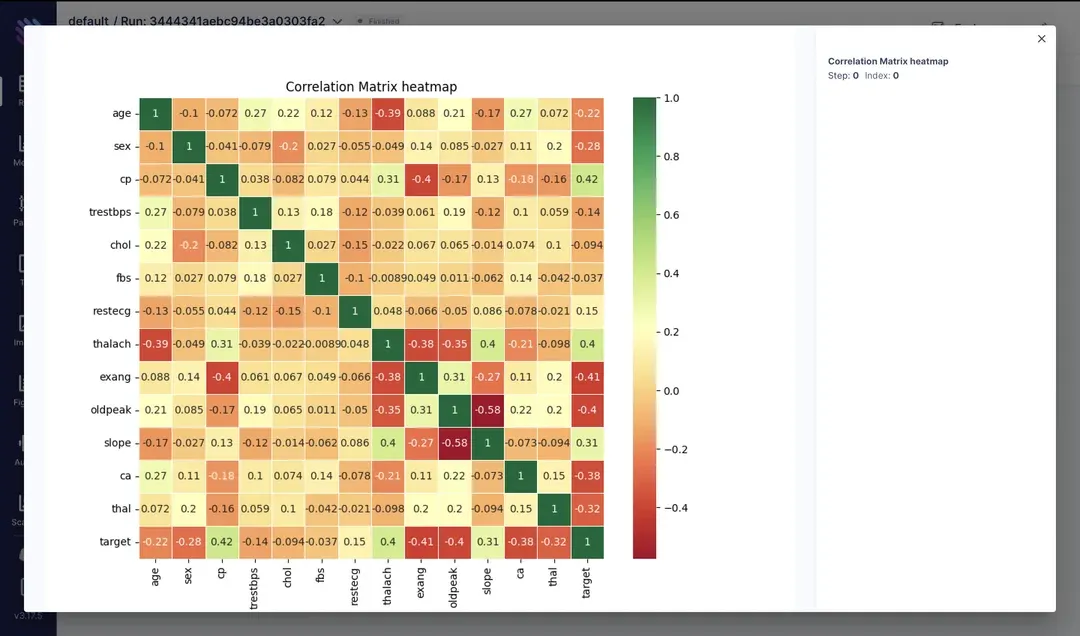
Use color gradients for clarity: color gradients can help you highlight the difference between strong, moderate, and weak correlation. You can use a diverging scale for this: blue for negative, red for positive, and white for near-zero correlations.
Annotate with correlation coefficients: include the correlation values in each cell of the matrix. Colors are helpful, but the numeric value adds more clarity and helps the reader get to the point quicker.
Be mindful of sample size: the sample size should be large enough to produce meaningful correlations. Small sample sizes can skew your data. In these cases, report or include confidence or p-values to show how statistically significant the results are.
Group or filter variables: do this before creating a correlation chart, because too many variables make it cluttered and hard to read. Start by grouping variables into categories (e.g., demographic data, behavioral data) or filtering them to show only those variables that are highly correlated.
Check for multicolinearity: if you have high correlations (above 0.9) between the predictor variables in your model, this could be a sign of multicolinearity. If you detect it, remove one of the highly correlated variables or use principal component analysis.
Handle missing data appropriately: remove data with missing values or impute reasonable values. Methods that can help include data removal, mean imputation, and K-nearest neighbours imputation.
Pair correlation charts with other chart types: complement your correlation charts with other visualizations such as scatter plots or heatmaps. Besides correlation, these chart types can show the actual nature of relationships between data points.
How to build a correlation chart in an embedded dashboard
Correlation charts are more common in data science notebooks than in product dashboards, but they have a legitimate place in embedded analytics when the user base is comfortable interpreting them. The main constraint is that most business users do not intuitively read a correlation matrix, so context matters.
If you are embedding a correlation chart, pair it with a brief explanation of how to read it — ideally inline rather than in documentation. A color key that distinguishes strong positive, neutral, and strong negative correlations reduces the cognitive load of interpreting the coefficient values directly.
For the data itself, ensure that all variables in the matrix are on a continuous or ordinal scale. Categorical variables need to be encoded before correlations are meaningful. Also consider whether the dataset has enough rows to produce statistically stable coefficients — a correlation calculated on twenty rows is unreliable.
From an implementation standpoint, correlation matrices can be rendered as heatmaps, which most embedded analytics platforms support natively. Luzmo AI can surface correlation insights conversationally — a user can ask which variables in their dataset are most strongly related and receive an answer without building a matrix manually — which is often more accessible for non-technical end users.
Visualize your data with Luzmo
At Luzmo, we help you add data visualizations to your product. Correlation charts are just some of the many chart types you can add to your product’s built-in, interactive dashboard and show your end-users the true value of their data.
Thanks to a powerful API and a number of data sources, connecting Luzmo to your app is a matter of hours, not weeks or months.
Ready to give your end-users actionable insights? Grab your free trial of Luzmo today! Luzmo starts at €1,995 per month, billed annually, with a platform fee plus adoption-based usage and no internal builder seat licences.
FAQ
All your questions answered.
What does a correlation chart show?
A correlation chart illustrates the strength and direction of relationships between two numerical variables. Positive correlation means both move together; negative means one goes up while the other goes down; near zero suggests little linear relationship. Correlation coefficients quantify this strength.
Does correlation imply causation?
No. Correlation indicates association but does not prove that one variable causes the other to change. Other factors, like hidden variables or coincidence, can explain correlations. Always pair correlation with deeper analysis before assuming causality.
What are typical use cases for correlation charts?
They’re popular for exploratory analysis: understanding relationships between sales and marketing spend, customer behavior metrics and churn, or external factors like weather and demand. They help identify leads for deeper investigation.
How do I interpret correlation coefficients visually?
A correlation close to +1 means a strong positive trend, near -1 means a strong negative trend, and around 0 means no clear linear trend. Scatter plots with best-fit lines help visualize these patterns before quantitative interpretation.
Written by

Ship the future of your data
Let us show you what Luzmo can do for your product.

Book your session with our analytics expert.