Product Release Update – September 2026
This release is about consolidation. Most analytics products, ours included, have collected AI features one at a time: a chat panel here, a generate button there, none of them aware the others exist. This month we merged ours into a single agent and taught it to work on a whole dashboard instead of one chart.
Ask the universal agent anything and pick the conversation back up next week. Build, edit and translate an entire dashboard from one prompt, in Studio or through the API. Reach into linked datasets from inside a formula. And see exactly which queries your agents sent to your database.
Ask the universal agent instead of three chat panels
The Analyst page is now called Home, and the chat living there is the Universal Luzmo Agent, available to every customer. Instead of separate panels that each do one trick, there is one agent that handles data analysis, chart building and dashboard creation in a single conversation.
The difference shows up on the questions you used to give up on. "Show 3 different charts to visualize sales over time" works. So does "Generate 2 dashboards, one with key metrics for PMs, another for engineers."
You get:
- One entry point: data analysis, visualization and dashboard creation in the same chat.
- In-chat dashboard previews: see what the agent built, then save it as an editable dashboard.
- Multi-part prompts: combine several asks into one message instead of breaking them up.
- Conversation history: view, reopen, continue and rename past chats.
- History on the API too: every conversation is stored and retrievable by default, so if you are building your own chat experience on Luzmo, you do not need a persistence layer for it.
Worth being straight: this is the first version, not the finished article. Dashboard building also lives in Studio as its own panel, so there are two places to ask. Start on Home when you are working from nothing, and use Studio when the dashboard already exists. More on that one next.
→ Dive into the Luzmo IQ API docs (opens in new tab)
Build a whole dashboard from one prompt
AI building in Studio used to be scoped to a single chart, with no idea what else was on the dashboard around it. The Dashboard Agent works dashboard-wide: describe what you want and it builds the whole thing, layout and all.
You get:
- Full dashboards from a single prompt: following your layout, or one the agent designs.
- Reference images and voice input: show it what you want, or describe it out loud.
- Edits on existing dashboards: add, move or delete charts and filters.
- Whole-dashboard translation: every title, label and filter in one pass.
- A capability check: ask what it can do and it answers honestly.
- Undo: roll back the agent's changes from the button under its last message.
- Programmatic generation: build dashboards through the API, then persist the result.
The part worth your attention is the API. Dashboards can now be generated programmatically, at scale, through the same /aiprompt endpoint. That covers onboarding and bulk provisioning, migrating a library of dashboards off another vendor, and generating ad-hoc dashboards personalized per end user on the fly, instead of hand-building and maintaining one dashboard per customer or use case.
You will find it as a new Agent button in the Studio side menu. Came from the agent on Home? A dashboard you saved there opens in Studio like any other, and this is where you carry on shaping it. If you embed the Luzmo editing experience, it appears in the updated embedded Studio and can be switched off per embed token.
→ See the dashboard generation example in the docs (opens in new tab)
Reach into linked datasets from a formula

Writing a formula used to mean working with one dataset's columns, even when the number you needed sat in a lookup dataset one link away. The workaround was reshaping data upstream, a lot of effort for one calculation.
Now the linked datasets show up in the formula editor itself. The one to open is the master dataset, the "many" side of the link, where the linking value repeats. If Sales links to Customers on Customer ID, Sales is the master: one customer, many orders. Open the transactional dataset, not the reference list. (Linking datasets (opens in new tab) has the direction rule.)
Open a dataset, select Add → Formula, and the Data section now lists its linked lookups alongside its own columns. Expand one, drag the columns you want into the formula, and use them in nested aggregations, including as grouping dimensions.
You get:
- Lookup columns in the picker: browse and select columns from directly linked datasets.
- Mixed calculations: combine current and linked dataset columns in the same formula.
- Nested aggregation support: including grouping by a linked column.
Two caveats worth knowing. The editor lists directly linked lookups only, not datasets further down a chain: for A → B → C, a formula referencing just A and C can fail unless B already appears in the chart's query. And a lookup returns at most one matching record, so duplicate or missing lookup keys can skew a result without raising an error. Check that your keys are unique.
→ Using columns from linked datasets (opens in new tab)
See what your agents ask your database
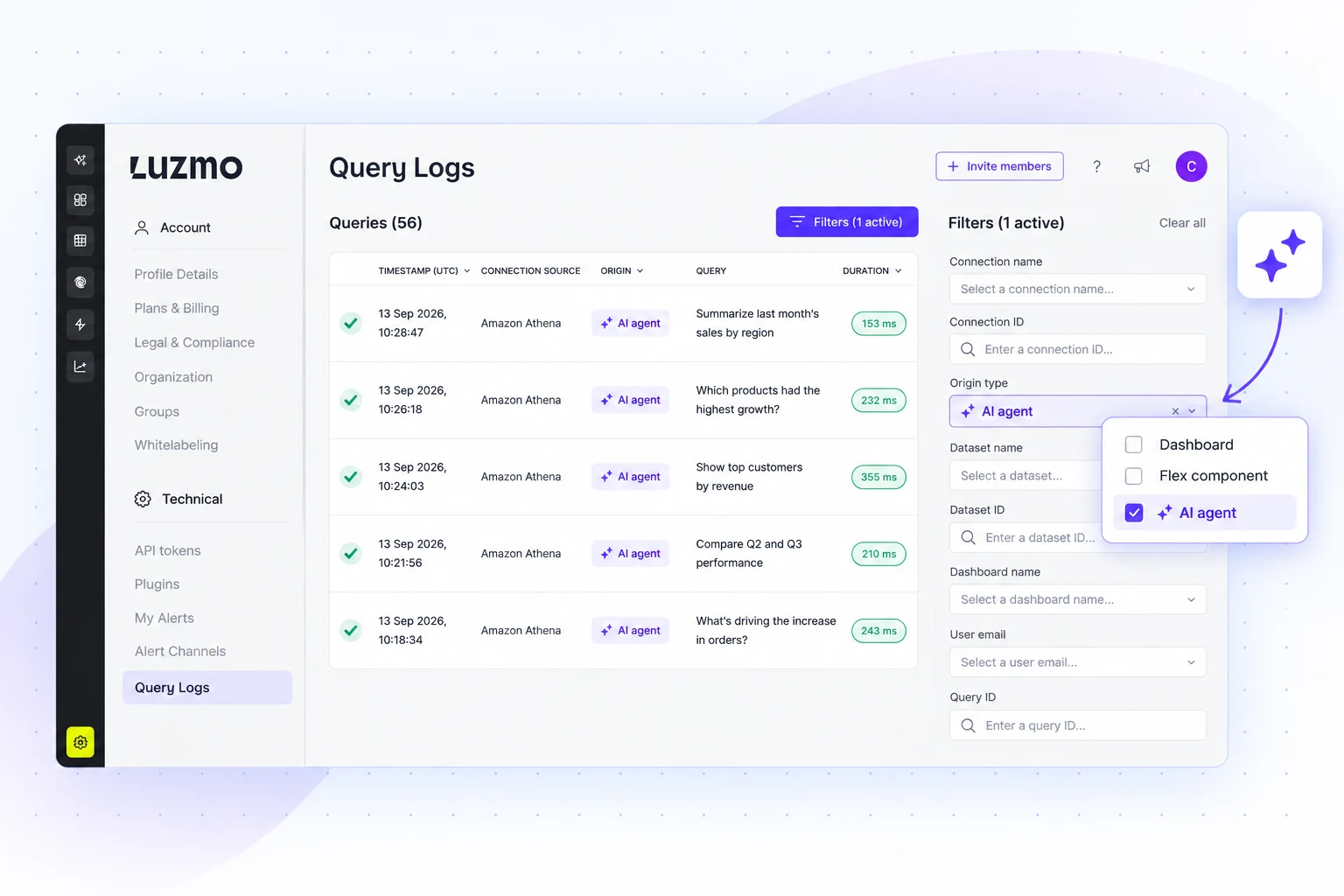
Query logs only ever showed dashboard queries, which got awkward once agents started generating queries of their own. Both now land in the same place.
A new Origin column tells you where each query came from, and a filter lets you narrow to the origins you care about. So when an agent hands back something that looks wrong, you can go and read the query it actually ran instead of reasoning backwards from the answer.
You get:
- Agent queries in the log: alongside the dashboard queries that were already there.
- An Origin column: so you can see at a glance where a query came from.
- An origin filter: narrow to one or more origins without scrolling.
Get started with these new features
Everything here is live in your Luzmo account right now. Open Home and ask the agent to build you a dashboard, it is faster than you expect.
Questions or feedback?
Reach out to your CSM or drop us a line at hello@luzmo.com.
Written by

Ship the future of your data
Let us show you what Luzmo can do for your product.

Book your session with our analytics expert.