Embedded AI Analytics: Make AI Agents Speak Your Data's Language
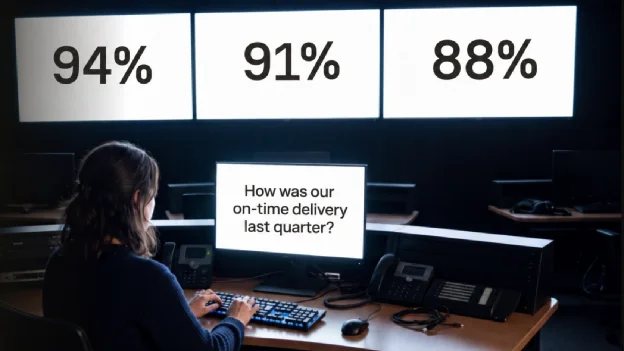
AI has changed how people work with data in two ways.
First, people who aren't data experts now do analyst work. A customer success manager builds her own dashboard. An operations lead asks "Which carriers missed the most deliveries last month?" and gets a chart in seconds. Questions that used to wait a week for an analyst now get answered on the spot.
Second, data no longer stays in the dashboard where you put it. Users connect your platform to Claude or ChatGPT through an MCP server. They pull numbers through your API into Claude Code. They mix your data with their CRM, their spreadsheets and their email, and get their answers there.
For anyone who builds software, that raises an uncomfortable question.
Are we becoming a dumb pipe?
Users skip your UI and take your data to another tool. If your product only passes raw data through, the AI tool on the other end gets the credit for the insight. You become a dumb pipe.
It gets worse when the answers don't match. Take a logistics platform. One of its customers asks "How was our on-time delivery last quarter?" in three places:
- The prebuilt dashboard says 94%.
- The in-app AI chat says 91%, because it used calendar quarters instead of the customer's fiscal quarters.
- Claude, connected over MCP, says 88%, because it counted a delivery as late at one minute past the delivery window. The platform allows 30 minutes.
One question, three numbers. The customer doesn't blame Claude. They blame you.
Two ways to respond
We see software companies react in two ways.
The defensive way. Rebuild what the big AI labs offer inside your own UI, and make it hard or expensive to connect to your data from outside. That means racing against frontier AI labs that spend billions on models, while frustrating users who already picked their AI tool.
The other way. Accept that your value isn't where your data is shown. It's what your data tells your customers. Nobody knows better than you that a delivery counts as on time within 30 minutes, or that your customers' fiscal year starts in April. If every agent reads your data with that knowledge, wherever it runs, you're not a pipe. You're the expert behind every answer.
That takes two things: a place to write down what your data means, and a way to bring that knowledge everywhere your users ask. In Luzmo, those are the Knowledge Layer and Agents.
Knowledge Layer: write down what your data means
Give an AI agent raw access to your data and it gets far. But it sees column names, not meaning. A column called del_status with values 1 to 4 tells it nothing, so it guesses.
The Knowledge Layer lets you add business knowledge and instructions to your data, so agents read it the way your team would. It’s made up of two components: AI context and Rules.
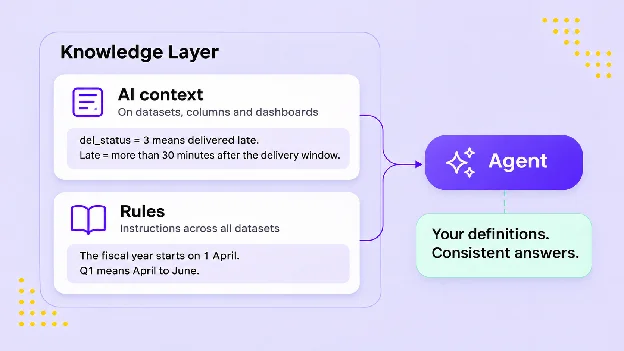
AI context is a note on a dataset, a column or a dashboard:
- "del_status 3 means delivered late. Late means more than 30 minutes after the delivery window."
- "All amounts are rounded numbers."
Rules are instructions that apply across all your datasets:
- "The fiscal year starts on 1 April. Q1 means April to June."
- "Revenue means net revenue after refunds, in every dataset."
- "An active customer placed an order in the last 90 days."
- "Compare December delivery performance with last December, not with November. December is always busier."
Agents then answer with your definitions instead of guessing from column names, and the same question gets the same answer, whoever asks and wherever. Rules are plain text, so your product or customer success team can manage them without a developer: Save a draft, publish when it's ready, and every linked Agent uses it right away. Many small Rules are also easier to read, update, and hand over than one long prompt.
We did this in our own demo app, Sales Compass. We moved most of a long custom prompt into the knowledge layer, which is easier to manage, and could remove the rest thanks to agent improvements.
Back to the logistics platform. One AI context note defines "late". One Rule defines the fiscal quarter. Ask the question again in any of the three places, and the answer is 94% everywhere.
Agents: your expertise, packaged and ready to use
Writing down what your data means is half the job. The other half is making sure that meaning reaches every place your users ask questions.
Without Agents, you set up the same datasets, instructions and settings again for every integration: once for the in-app chat, once for the MCP server, once for your own assistant. Each copy drifts a little over time. That's how you end up with three different numbers.
An Agent removes that work. You decide once, in the Luzmo app, which data it looks at, what it can do (answer questions, create charts, build dashboards) and which Rules it follows. The result is one Agent with one ID. Wherever you use that ID, the Agent brings the same data and the same knowledge.
This also changes how you improve your AI. Making answers better no longer takes a developer and a release. You open the Agent, try a few questions, adjust a dataset or a Rule, and the change is live everywhere the Agent is used. The team that hears the customer feedback can act on it the same day.
Agents also let you stay focused. A delivery Agent only looks at shipment and carrier data. A billing Agent only looks at invoices. An agent that sees less noise gives better answers. An Agent narrows what the AI looks at. It never widens who can see what. Your existing access rules still decide that, so customer A never sees customer B’s deliveries.
And because Agents use the custom charts you already built, on-time delivery looks the same in a chat as on your dashboard.
Where your Agent can live
Because an Agent is a single ID, you can use it in many places:
- In your product. An AI chat beside the Luzmo dashboards you already embed, for follow-up questions about what users see. Or a full in-app AI analyst, where users ask anything about their data and get answers, charts and full dashboards.
- Inside your own agent. Your AI assistant hands data questions to your Luzmo Agent over the API or MCP and gets a grounded answer back. No need to rebuild analytics inside your agent.
- In your customers' AI tools. Through your own branded MCP connector, powered by Luzmo, your customers add your data to Claude or ChatGPT. They see your brand, not ours, and only their own data. Technical users can pull the same data into Claude Code or Cursor.
- In apps you run. Your Luzmo Agent can be the agent behind a Slack bot, a messaging app or a weekly email you build on our API.
Every place uses the same data, the same Rules and the same access rules. Configure once, answer everywhere.
See how your data is used
You probably track how customers use your dashboards. You need the same for AI, wherever it runs.
Agent Logs show what your users ask, which answer they got (with charts and dashboards replayed as they saw them), which data and context the agent used, where context was missing, and whether the user gave a thumbs up or down.
That closes the loop. Say the logs show users asking about "damaged deliveries", and the agent doesn't know which column holds that. Add one AI context note, and from then on every Agent that uses that dataset takes it into account, wherever it runs.
Conclusion
AI doesn't take value away from your product. It moves it: from where your data is shown to what your data means.
You can defend where your data is shown, and race AI labs you can't outspend. Or you can own what your data means. That's a race you already lead, because nobody knows your domain better than you.
In Luzmo, that comes down to three steps:
- Specify what your data means in the Knowledge Layer.
- Bundle that knowledge with your data in an Agent, and use it wherever your users ask.
- Use Agent Logs to see where answers fall short, and fix them everywhere at once.
Do that, and a new AI tool is no longer a place your users leave you for. It's one more place your expertise shows up.
Let your data go anywhere. Make sure your expertise goes with it.
Agents and the Knowledge Layer are live for all Luzmo customers. See them in action at our webinar on November 24: Why context makes or breaks AI analytics.
Written by
Ship the future of your data
Let us show you what Luzmo can do for your product.

Book your session with our analytics expert.