Claude for Data Analysis: What It Does in Excel (2026)
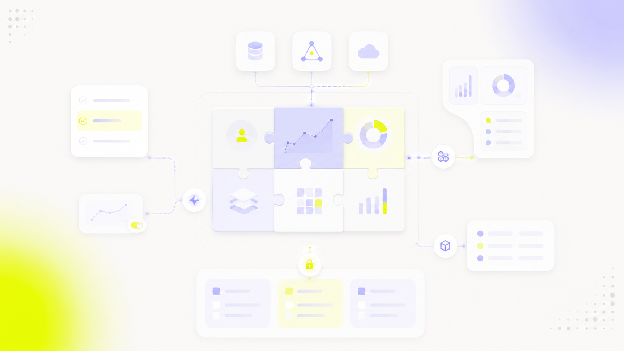
If you are here to install it: it is called Claude for Excel, and it lets Claude work directly with your spreadsheets rather than only explaining what you should change. It runs as an add-in inside Excel on the web, on Windows, and on Mac, and it can work with formulas, data and charts inside the workbook itself. It is generally available on the paid Claude plans, so if you are on the free tier, that is the first thing to sort out.
Getting Claude into Excel is the easy part. Working out what you should trust it with takes longer.
This guide covers what Claude is genuinely useful for in a spreadsheet, what still needs checking, and what happens when an Excel workbook stops being an appropriate way to deliver analysis at all.
What Claude does well with spreadsheet data
Cleaning messy columns
Inconsistent dates, stray whitespace, country names spelled four different ways, category labels that drifted apart over two years of manual entry. This is one of the strongest use cases, and the reason is structural: the task is repetitive, rule-based, and easy for a human to verify at a glance. You can eyeball a cleaned column and know immediately whether it worked.
Explaining formulas you inherited
Someone opens a workbook containing a nested INDEX/MATCH, a 200-character IF statement, or a lookup chain left behind by a person who no longer works at the company. Claude can explain in plain English what the formula is doing, and it can trace how a given number was derived, with citations back to the cells involved.
This works well because Claude is reading existing logic rather than inventing an answer.
Writing formulas from a description
"Sum column D where column B is this quarter and column F is not blank."
Treat this as a productivity use case, not as proof that Claude should be trusted unquestioningly. The workflow that holds up: generate, test in one cell, inspect the result against something you already know, then fill down.
Building and editing charts in the workbook
Claude creates and modifies actual chart objects inside the workbook rather than handing you instructions for building them yourself. It will create the helper table a chart needs, build the visualisation, and rebuild it if the first version is not what you meant. Waterfall charts, combination charts, retention visualisations. The charts stay tied to the workbook data, which means they update the way any native chart does.
Editing models, not just describing them
This is the real difference from a chatbot conversation. Claude can modify formulas, dependencies, references and workbook structure directly. It can flex a growth assumption and let the downstream cells recompute, populate a template, or build a model from a description.
That is useful, and it introduces the biggest risk in the next section: an incorrect change can look perfectly legitimate.
Summarising an unfamiliar sheet
Useful questions to open with: What does this workbook contain? Which columns look like keys? Where are values missing? Which tabs depend on one another? What deserves attention first?
Auditing
Broken references, hard-coded numbers sitting inside formula ranges, circular logic, formulas that are inconsistent across a row that should be uniform. Claude will also trace the root cause of a #REF! or #DIV/0! rather than just flagging that it exists.
Treat this as an additional review layer, not a replacement for financial or data QA.
Where Claude for Excel stops
Errors that look correct
The workbook does not visually distinguish between a properly derived number and an incorrectly derived but plausible one. Both appear in the same font, the same formatting, the same cell. Nothing in the interface tells you which is which.
That is the entire reason verification matters more here than in most AI workflows. A wrong sentence in a document reads as wrong. A wrong number in a spreadsheet reads as a number.
Verification does not come free with capability
The more directly an AI tool can manipulate a workbook, the more auditability matters.
A tool that gives you a suggestion can fail visibly. A tool that edits the spreadsheet for you can fail quietly.
This is not an argument against letting Claude edit. It is an argument for keeping the calculation in the sheet, where you can inspect it, rather than accepting a pasted-in result.
Untrusted workbooks carry instructions too
Anthropic's own documentation is direct about this: only use Claude for Excel with trusted spreadsheets. Downloaded templates, vendor files and data imports can contain hidden instructions designed to manipulate the add-in into extracting data, modifying records, or taking destructive actions. Claude asks you to confirm before running a risky operation, which is exactly the moment to actually read the confirmation rather than clicking through it.
Practically: start from a trusted copy of the workbook before asking Claude to edit widely, and be more careful with files that arrived from outside your organisation than with ones your team built.
Things it does not do
Macros and VBA operations are not supported, and neither are Excel data tables. If your model leans on either, that part of the work stays manual. The add-in also does not run on Excel 2016 or 2019 perpetual licences, or on iPad and Android.
Large or wide workbooks
There is no published ceiling on workbook size, and inventing one would be unhelpful. The useful test is your own: run it against your largest and most complicated files before you build a process around it. Long conversations are compacted automatically to avoid running out of context, which is good for keeping a session alive and worth knowing about if you expect Claude to remember something you said forty steps ago.
One analysis does not become organisational knowledge
Chat history in the add-in is stored locally in your browser rather than on Anthropic's servers, and it does not sync across devices. That is a reasonable privacy posture, and it also means the reasoning behind an analysis lives in one person's session on one machine.
If the assumptions and decisions behind a workbook are not documented somewhere durable, the next person reviewing it has to reconstruct them. That is a workflow problem rather than a model problem, but it shows up the moment more than one person depends on the output.
The workbook is still a workbook
At this point the constraint is no longer Claude. A workbook remains a poor distribution layer when a lot of people need the analysis, different users need different slices of the data, the numbers need to stay current, customers need access, or permissions matter.
None of this makes Claude a bad analysis tool. It makes it an analyst's tool, which is a different thing from a reporting system.
Claude for Excel vs ChatGPT for Excel
Both products work directly with spreadsheet workflows, and both are moving fast enough that any feature comparison written today will be partly wrong by next quarter. As of August 2026, the shape of the difference looks like this.
| Claude for Excel | ChatGPT for Excel | |
|---|---|---|
| Where it runs | Excel on web, Windows, Mac | Excel on web, Windows, Mac, plus Google Sheets |
| Plan access | Paid plans only (Pro, Max, Team, Enterprise) | Available across free and paid tiers, with usage limits |
| Works in the sheet | Yes, edits formulas, values and charts | Yes, creates and updates spreadsheets |
| Best way to compare | Auditability and workflow fit | Auditability and workflow fit |
That table will change. The more useful comparison is whether you can verify the number either assistant gives you.
Which one should you trust with a number?
Frame the decision around traceability rather than model intelligence. Four questions do most of the work.
1. Can you see how the figure was derived? A formula left in the workbook is easier to audit than a number inserted into a cell. Prefer the tool and the prompt that leave the calculation behind.
2. Can you trace the answer back to its source cells? You should be able to click through from a claim to the data that produced it, without rebuilding the logic yourself.
3. Can you see what the AI changed? Undo is useful. Understanding which formulas, ranges or dependencies were modified is more useful, because it is the difference between reverting a mistake and noticing one.
4. Can somebody else review it? If the next analyst has to repeat the entire investigation before trusting the output, the analysis is not ready to become a shared reporting asset.
Those questions will still be useful after the next Claude or ChatGPT release. A feature checklist probably will not be.
We looked at the same problem from the visualisation side in Can ChatGPT create a dashboard?, and at the broader tooling landscape in Best AI data visualisation tools.
When a spreadsheet stops being the right answer
A Claude-assisted spreadsheet can be an excellent analyst tool and still be a poor product surface. You cross that line when somebody who did not perform the analysis needs to consume the result repeatedly.
The same question arrives every week
If somebody asks for the same report every week or every month, you are no longer doing one-off analysis. You are maintaining a reporting workflow, by hand, with a person as the scheduler.
Someone asks for "their" version
One person needs Germany. Another needs France. A customer should only ever see their own account. That is a permissions and personalisation problem, not an Excel problem, and no amount of AI assistance inside the workbook solves it.
The number needs to stay current
A decision-making interface cannot depend on somebody remembering to download, update and resend the latest workbook.
A customer needs access
This is the clearest boundary of the four. Sending customers spreadsheets does not create a scalable analytics experience, no matter how good the spreadsheet is.
The answer is not necessarily a bigger spreadsheet
Past that point, the requirement changes. You do not need a more capable spreadsheet assistant. You need an analytics layer that stays connected to the underlying data, respects who is asking, and makes the result available where the decision is actually being made.
AI is changing that interface too. A user may not always start from a dashboard. Increasingly, they can start from a question.
What happens when the question becomes the interface?
Traditional analytics asks the user to find the right dashboard, select the filters and interpret the visualisation. AI agents introduce another route: start with the business question, and let the analytics layer retrieve the relevant data and the relevant visualisation.
That does not make dashboards or analytics infrastructure disappear. The interface becomes conversational while the questions around data access, business logic and reliable outputs stay exactly where they were.
Watch: how AI agents change the way users interact with embedded analytics.
What if Claude needs live product data instead of an Excel file?
Uploading an XLSX file to Claude and letting Claude query live product data are two different architectures.
In the Claude plus Excel workflow, Claude sees the workbook context you hand it. That is well suited to exploration, modelling, cleaning and one-off analysis.
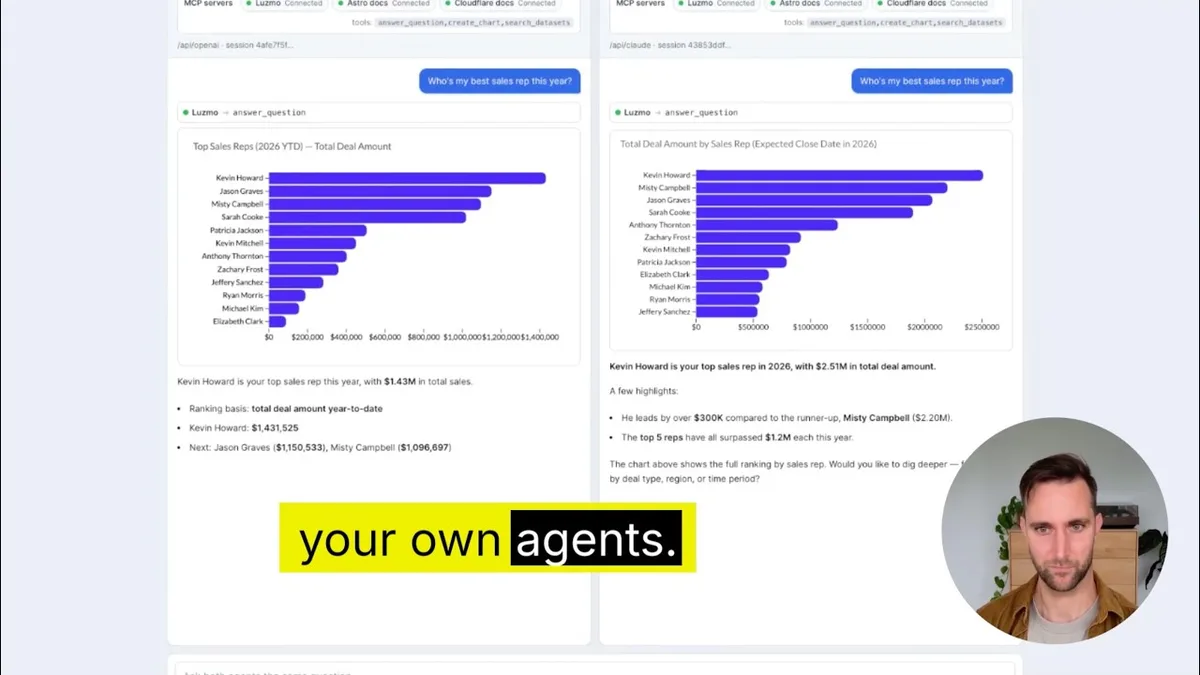
In the Claude plus a governed analytics layer workflow, an AI assistant interacts with the analytics layer directly, and the application's existing access rules still apply. One example is Luzmo's Embedded MCP Server. Instead of treating an exported spreadsheet as the source of truth, the assistant works against the analytics layer while access stays scoped to the user and the application context.
That changes the problem from "Can Claude understand this Excel file?" to "Can Claude answer the user's question using the live data they are allowed to access?"
These are complementary, not competing. Claude for Excel helps someone work with a spreadsheet. An MCP-connected analytics layer addresses what happens when AI needs governed access to data inside a live product.
See the jump from prototype to embedded analytics
If you want to see what happens after the spreadsheet and prototype stage, we recorded a live build showing an embedded analytics implementation created with AI assistance. The useful part is watching where AI genuinely accelerates development and where the actual product requirements still show up: data connection, embedded experience, and the infrastructure around the output.
You can watch the full live AI workshop and follow the build yourself.
So where is the actual boundary?
Claude can make the spreadsheet stage much faster. It can clean the source data, explain somebody else's model, generate formulas and build the visualisations.
None of those capabilities turn a workbook into a live analytics product.
Once people need continuously updated data, governed access, or analytics inside the product they already use, the problem has moved from spreadsheet analysis to embedded analytics. We cover the implementation side in how to build AI-powered dashboards.
Your spreadsheet answered the question. Now make the answer available inside your product.
Build embedded dashboards and AI-powered analytics on top of your product data with Luzmo. Book a demo and see it running against your own data.
If your requirement has already moved beyond files and one-off analysis, our guide to embedded analytics tools covers what changes when analytics becomes part of the product itself.
FAQ
All your questions answered.
Can Claude analyze Excel files?
Yes. Claude for Excel is an add-in that works with the workbook you have open, so it can answer questions about your data, write and edit formulas, build charts, and change values while keeping formula relationships intact. Answers come with cell-level citations you can click. Outputs still need checking, and Claude is most useful when the calculation stays visible in the sheet rather than being pasted in as a finished number.
Can Claude read CSV files?
Yes. You can upload a CSV to Claude and ask it to clean, summarise, or analyse the data. That covers one-off analysis well. It does not cover persistent reporting, where the same numbers need to refresh on a schedule, respect who is asking, and stay available to people who did not run the analysis.
Is Claude for Excel free?
No. Claude for Excel is generally available on the paid Claude plans (Pro, Max, Team, and Enterprise) and is not part of the free plan. There is no separate add-in fee on top of the subscription. Plan availability changes, so check Anthropic's current documentation before you buy.
Is Claude better than ChatGPT for data analysis?
Neither one wins outright, and the honest answer is that the gap between them is smaller than the gap between a spreadsheet and a reporting system. Both work directly with spreadsheet data. The criteria worth comparing are the ones that survive the next release: workflow fit, traceability, auditability, integrations, and what your plan actually includes.
Can Claude create charts?
Yes. Claude can build charts inside the workbook, including creating the helper tables a chart needs, and rebuild them if the first version is wrong. That solves the visualisation task. It does not solve distribution, per-user permissions, live data, or analytics your customers can use inside your product.
Written by

Ship the future of your data
Let us show you what Luzmo can do for your product.

Book your session with our analytics expert.