Enterprise Analytics: What Changes When Your Product Sells Upmarket
You know your analytics feature has become enterprise-critical when the buyer stops asking about dashboards and sends a 200-line security questionnaire.
Suddenly, the questions change. Can analytics use our identity provider? Who can see which customer's data? Is there an audit trail? Where does data live? What happens if usage spikes? The chart still matters, but it is no longer the whole story.
Enterprise analytics is where product experience meets security review, procurement and customer trust.
Best for: Product and engineering teams whose analytics feature is starting to show up in enterprise sales, procurement, security review or customer onboarding.
Enterprise analytics, in one sentence
Enterprise analytics is the data experience, reporting layer and control system a software product needs when larger customers expect secure, governed and reliable access to analytics inside the product they buy.
That definition matters because enterprise analytics often gets described as internal BI for large companies. That is only one version. For SaaS and data-heavy products, enterprise analytics usually means something more specific: giving customers analytics inside your product in a way that can pass enterprise evaluation.
Internal teams care about dashboards. Enterprise buyers care about dashboards plus identity, roles, tenant boundaries, auditability, support and contractual risk.
If your analytics is customer-facing, the enterprise version is not just a better report. It is a product-readiness layer.
The moment analytics becomes enterprise-critical
Early analytics requests are usually practical.
A customer asks for a dashboard. Another asks for exports. Someone wants scheduled reports. Product builds enough to make the feature useful, sales shows it in demos and customer success starts relying on it during onboarding.
Then larger accounts enter the pipeline.
The same analytics feature now goes through a different kind of review. Security wants to know how users authenticate. Procurement asks how data is processed. Legal asks about data handling. Customer admins ask if permissions match their organization. An executive sponsor wants reporting to look like part of the product, not a third-party tool bolted onto the side.
That is the moment analytics becomes enterprise-critical.
Nothing about the dashboard may have changed. The buying context changed around it.
Enterprise analytics is not prettier dashboards
A better-looking dashboard can help adoption. It will not answer the questions that slow down an enterprise deal.
Enterprise-ready analytics usually has two layers.
The visible layer is what users interact with:
- dashboards
- reports
- exports
- drilldowns
- AI summaries
- scheduled delivery
The hidden layer is what buyers evaluate:
- identity and SSO
- roles and permissions
- tenant isolation
- audit logs
- data processing
- performance
- uptime
- support ownership
- implementation effort
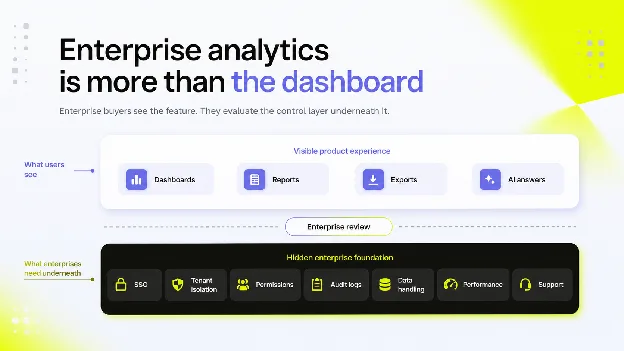
This is why internal BI and customer-facing embedded analytics are not the same buying decision. BI tools help internal teams analyze company data. Embedded analytics brings data experiences into a product used by external customers. Luzmo's guide to embedded analytics vs BI tools covers that distinction in more depth.
Enterprise buyers evaluate the product version more strictly because their own users, data and customers may depend on it.
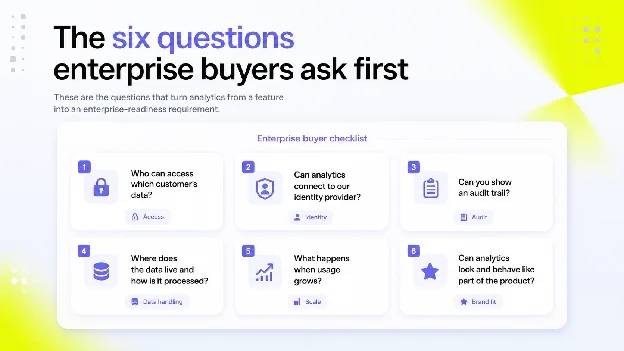
The six questions enterprise buyers ask first
The questions vary by industry, but the pattern is usually familiar. Larger buyers want to know if analytics can fit their security, governance and product expectations.
1. Who can access which customer's data?
This is the first enterprise analytics question because every other answer depends on it.
If a customer has multiple teams, regions or business units, analytics needs to respect that structure. If your product is multi-tenant, the analytics layer must keep customer data separated in the same way the rest of the product does.
That may involve row-level security, tenant-aware queries, scoped embed tokens, inherited roles or application-level access rules. The exact implementation depends on the product. The principle does not change: a user should only see the data they are allowed to see.
For more technical context, see Luzmo's guide to multi-tenancy.
2. Can analytics connect to our identity provider?
Enterprise buyers often want analytics to work with their existing authentication model. In practice, this means questions about SSO, OIDC, SAML, user provisioning and role mapping.
OIDC is one common pattern for modern authentication. Microsoft describes OpenID Connect as extending OAuth 2.0 for authentication and enabling SSO through ID tokens. OpenID describes it as an interoperable authentication protocol built on OAuth 2.0. The exact requirement in a deal will depend on the buyer's identity stack.
For product teams, the implementation question is more concrete: can the analytics experience receive enough user context to show the right data, roles and workspace without creating a separate login island?
If analytics feels separate from the product login model, it becomes harder to defend in enterprise review.
3. Can you show an audit trail?
Enterprise customers may ask what happened inside the analytics layer, especially if analytics supports regulated, sensitive or customer-visible workflows.
An audit trail helps answer questions such as:
- who viewed a dashboard
- which report was exported
- which tenant or workspace applied
- when the action happened
- what permission context was used
- which automated workflow ran
Security logging guidance from OWASP frames useful logs around the basics of when, where, who and what. That same logic applies to enterprise analytics. If analytics is part of the product experience, buyers may expect enough traceability to investigate access, errors or suspicious activity.
Auditability is not glamorous. It becomes very important the first time a customer asks for it.
4. Where does the data live and how is it processed?
Enterprise buyers may ask how analytics handles data, not only what it shows.
They may want to know:
- where data is stored
- how data moves between systems
- if analytics queries live data or cached data
- how exports are handled
- how long logs are retained
- which subprocessors are involved
- what happens when a customer deletes data
Not every buyer will need the same answer. A healthcare, finance or public-sector customer may ask much deeper questions than a mid-market SaaS account.
There is no one universal enterprise checklist. The useful move is to prepare the answers before the deal depends on them.
5. What happens when usage grows?
Enterprise analytics has to hold up when more users, dashboards, tenants and queries arrive.
A demo can feel fast with one dataset and one user. Enterprise accounts often introduce heavier usage patterns:
- many users viewing dashboards at once
- larger datasets
- scheduled reports
- more exports
- embedded analytics in several product areas
- regional teams using the same feature differently
Performance is not only a technical metric. It affects trust. If analytics is slow or unreliable, customers may treat the whole product as less mature.
This is where product teams need to think about caching, query shaping, pre-aggregation, data model design and the cost of supporting analytics at scale.
6. Can the analytics experience look and behave like our product?
Enterprise buyers do not always want to feel like they have been handed a third-party reporting portal. They often expect analytics to match the product's UX, brand and workflow.
That means questions such as:
- can dashboards inherit the product's look and feel?
- can navigation feel native?
- can reports use customer-facing language?
- can charts live in the right product workflow?
- can analytics support client reporting or branded customer reporting?
White-labeling is not only cosmetic. It reduces friction for users and supports the perception that analytics is part of the product. For related reporting use cases, see Luzmo's guide to white-label reports.
Enterprise analytics platform, BI tool or embedded analytics layer?
Once enterprise requirements appear, product teams often face a build-or-buy decision.
The wrong choice is to treat every analytics need as the same problem. Internal teams, customer-facing users and enterprise buyers have different expectations.
| Option | Best fit | Risk |
|---|---|---|
| Internal BI tool | Internal reporting, analyst workflows, company-wide dashboards | May feel separate from the product and require more work for customer-facing embedding |
| Custom-built analytics | Highly specific product workflows with enough engineering capacity | Slow to build, expensive to maintain and easy to under-scope |
| Embedded analytics layer | Customer-facing dashboards, reports and analytics inside a product | Needs careful integration with data, identity, product UX and permissions |
| Enterprise analytics platform | Broad enterprise reporting or analytics standardization | May be too broad if the main problem is customer-facing product analytics |
There is no universal answer. A product with a small internal analytics need may be fine with BI. A data-heavy SaaS product selling to larger customers may need an embedded analytics layer that fits the product's UX and access model.
A practical rule helps:
If the user is your employee, internal BI may be enough. If the user is your customer, analytics becomes part of your product.
That shift changes the buying criteria.
What to check before your next enterprise demo
Enterprise readiness is easier to prepare before a deal exposes the gaps.
Use this checklist before analytics becomes part of the next enterprise review.
Identity and access
Can analytics use the same user context as the product? Can it map roles, workspaces, customer accounts or permission groups correctly?
Tenant isolation
Can each customer's data stay scoped to that customer, including dashboards, exports, scheduled reports and AI answers?
Auditability
Can your team explain who accessed what, when and in which context?
Branded experience
Can analytics feel native to the product, not like an external reporting tab?
Performance
Do you know what happens when a larger account adds more users, queries, dashboards or scheduled reports?
Support ownership
If a dashboard breaks, a report is wrong or a customer questions a metric, who owns the response?
AI and agent governance
If you add AI analytics, conversational analytics or agentic workflows, can those experiences inherit the same permissions and tenant boundaries as the rest of the product?
This last point is becoming more important. If analytics can be accessed by an AI assistant or agent, the product still needs to preserve identity, authorization and traceability. Luzmo's guide to MCP for analytics explains how agent access changes the interface, but not the need for governed data access.
Where Luzmo fits
Luzmo is built for product teams adding customer-facing analytics to software products.
That makes it different from an internal BI rollout. Product teams need dashboards, reporting and self-service analytics that can be embedded into the product experience, styled to match the application and connected to customer-specific data access rules.
Luzmo's embedded analytics platform supports product teams that want to ship analytics without rebuilding the full reporting layer from scratch. Depending on the implementation, that can include embedded dashboards, developer tooling, white-label experiences and AI analytics capabilities through Luzmo AI.
The enterprise point is not "add more charts." It is to make analytics ready for the way larger customers evaluate software: secure access, clear ownership, reliable performance and a user experience that belongs inside the product.
Make analytics enterprise-ready before the next deal asks
Enterprise analytics becomes urgent when a customer asks a question your product was not designed to answer.
Who can see the data? How is access controlled? Can analytics match our identity provider? Can you show what happened? Will it perform for a larger rollout?
Those questions are easier to answer when analytics was designed as part of the product, not added as a reporting shortcut after the deal is already in review.
If your product is moving upmarket, treat analytics as part of enterprise readiness. The dashboard is what users see. The control layer underneath is what buyers trust.
Explore Luzmo's embedded analytics platform to see how product teams add customer-facing analytics that fits inside the software experience.
FAQ
All your questions answered.
What is enterprise analytics?
Enterprise analytics is the data experience, reporting layer and control system a software product needs when larger customers expect secure, governed and reliable access to analytics inside the product they buy.
What is the difference between enterprise analytics and BI?
BI usually serves internal teams. Enterprise analytics inside a software product serves customers, admins or external users. That adds product UX, tenant isolation, branded analytics, procurement review and customer-facing reliability requirements.
What do enterprise buyers require from analytics?
Enterprise buyers may ask about SSO, roles and permissions, tenant isolation, audit trails, data handling, performance, uptime, support ownership and white-label UX. Requirements vary by buyer, industry and contract size.
Why does multi-tenancy matter for enterprise analytics?
Multi-tenancy matters because enterprise analytics often serves many customers, teams or workspaces from the same product. Each user should only see the data they are allowed to access, including dashboards, reports, exports and AI-generated answers.
Should product teams build or buy enterprise analytics?
Build when analytics is deeply unique and the team can maintain it long term. Buy or embed when the product needs reliable customer-facing dashboards, reporting and governance faster than an internal build can deliver.
Written by

Ship the future of your data
Let us show you what Luzmo can do for your product.

Book your session with our analytics expert.