10 Best Omni Analytics Alternatives in 2026
Omni Analytics has become a serious option for teams that want governed business intelligence, AI and customer-facing analytics on one semantic foundation. It combines a modeled data layer with SQL, spreadsheet-style exploration, dashboards and embedded delivery, and its acquisition of Explo in October 2025 made the customer-facing use case even more prominent.
That breadth is also why there is no single "best Omni alternative." The closest replacement depends on what you are actually trying to replace. Looker is the obvious comparison for governed semantic BI. Sigma is stronger when spreadsheet-style warehouse analysis drives adoption. ThoughtSpot is an AI- and search-led alternative. Power BI makes sense in a Microsoft-centered stack. Metabase is the pragmatic open-source option. And product teams whose main requirement is analytics inside their own SaaS product should compare Omni with embedded-focused platforms such as Luzmo, GoodData.AI and Sisense.
This guide compares 10 Omni Analytics alternatives across the criteria that matter in a real evaluation: semantic governance, embedded analytics, end-user self-service, AI, deployment, pricing visibility and implementation model.
If your use case is specifically customer-facing analytics, see our broader guide to embedded analytics tools. If you are deciding whether you need a BI platform or a product-focused embedded layer at all, start with embedded analytics vs. traditional BI.
The 10 best Omni Analytics alternatives in 2026
The best Omni Analytics alternatives are:
- Luzmo - best for customer-facing embedded analytics in SaaS products
- ThoughtSpot - best for AI-led search and natural-language analytics
- Looker - best for governed semantic BI in the Google Cloud ecosystem
- Sigma Computing - best for spreadsheet-style analysis on cloud warehouses
- Microsoft Power BI - best for organizations standardized on Microsoft and Fabric
- Metabase - best free and open-source option for internal BI
- GoodData.AI - best for governed, embedded analytics with deployment flexibility
- Hex - best for notebook-to-data-app workflows and technical analytics teams
- Holistics - best for code-first, dbt-friendly BI teams
- Sisense - best for component-level embedded analytics and enterprise customization
There is no universal winner. The fastest way to narrow the list is to decide whether your primary audience is your own analysts and employees or your customers inside your product. That one choice changes how much weight you should put on semantic modeling, embedding method, tenant isolation, white-labeling and pricing at external-user scale.
Omni Analytics alternatives at a glance
| Tool | Best for | Semantic/governance model | Customer-facing embedding | End-user self-service | AI / natural language | Pricing signal |
|---|---|---|---|---|---|---|
| Luzmo | Customer-facing analytics in SaaS | Governed metrics in Luzmo semantic layer | Core product use case; web components, SDKs and composable components | Embedded dashboard editing and configurable self-service | Embedded conversational and agentic analytics | Public starting prices; usage scales with solutions + MAUs |
| ThoughtSpot | AI-led analytics and search | Governed semantic layer / modeling | Dedicated ThoughtSpot Embedded offering with APIs and SDKs | Strong search-led exploration | Spotter AI agents and natural-language exploration | Public entry pricing for some plans; enterprise embedded pricing is flexible/custom |
| Looker | Governed enterprise BI on Google Cloud | LookML semantic model | Supported through embedding APIs/SDK | Strong governed exploration, but model-heavy | Gemini-powered analytics experiences | Sales-led / Google Cloud contracts |
| Sigma Computing | Spreadsheet-style warehouse analysis | Warehouse-native workbook/model controls | Available for embedded use cases | Strong for spreadsheet-oriented business users | AI assistance in analytics workflows | Confirm embedded pricing with sales |
| Microsoft Power BI | Microsoft/Fabric-centered enterprises | Power BI semantic models | Power BI Embedded / Fabric capacity | Strong internal BI self-service; embedded use has a different delivery model | Copilot across Power BI/Fabric; validate capabilities for your exact embedded scenario | Internal licenses are public; production embedding requires paid capacity |
| Metabase | Low-cost and open-source internal BI | Lightweight modeling / metadata layer | Paid embedding options; OSS is strongest for internal BI | Friendly visual query builder | AI capabilities vary by edition | Free OSS plus public paid plans |
| GoodData.AI | Governed enterprise and embedded analytics | Governed semantic layer, analytics-as-code | React SDK, Web Components and iframe | Self-service dashboards and AI-assisted exploration | AI assistant and agentic analytics | Enterprise-oriented; confirm deployment quote |
| Hex | Technical analytics, notebooks and data apps | Native semantic models plus external semantic-model sync | Signed embedding available as an Enterprise add-on | Strong for technical/business analysis via apps | Hex Agent across analytics workflows | Public core pricing; embedded analytics is an Enterprise add-on |
| Holistics | Code-first and dbt-friendly BI | Analytics-as-code semantic modeling | Lighter embedded use case than dedicated platforms | Good for modeled self-service | AI is secondary to modeled BI workflow | Public internal-BI pricing; confirm embedded terms |
| Sisense | Enterprise embedded analytics and frontend customization | Governed enterprise analytics layer | Multiple embedding routes including component-oriented SDKs | Broad enterprise self-service | AI-assisted analytics capabilities | Quote-based enterprise pricing |
For a product team, the table is only a shortlist. Run the same proof of concept in each finalist: one real tenant, one complex dashboard, one end-user self-service flow, your actual authentication model and your expected production concurrency. Feature checklists hide the implementation differences that decide whether an embedded analytics project succeeds.
Which Omni alternative is best for your use case?
If you already know the job the platform must do, use this shortlist before reading every vendor profile:
- Customer-facing analytics is the product feature: start with Luzmo, then compare GoodData.AI, Sisense and Omni on the same embedded proof of concept.
- AI search and conversational analytics are the center of the experience: compare ThoughtSpot with Omni.
- You want Looker-style governance in a Google Cloud environment: Looker remains the most direct enterprise comparison.
- Finance, operations or business teams live in spreadsheets: Sigma Computing is the most natural alternative.
- Your organization is standardized on Microsoft 365, Azure and Fabric: Power BI deserves to stay on the shortlist even if the embedded licensing model needs separate evaluation.
- You want open source and can own operations: Metabase is the pragmatic starting point.
- You need cloud or self-hosted deployment with strong semantic governance: evaluate GoodData.AI.
- Your analysts mix SQL, Python, notebooks, AI and published data apps: Hex is structurally different enough to be worth testing.
- Your data team wants analytics-as-code and dbt-friendly workflows: Holistics is a focused alternative.
- Your frontend team wants enterprise-grade component-level embedding: Sisense belongs in the final round.
What changed at Omni in 2025 and 2026
Omni has moved quickly enough that an evaluation based on its 2024 product is no longer useful. Here's what we could verify as of September 21, 2026:
- Omni acquired Explo, announced on October 22, 2025. Explo was an embedded-analytics specialist, and the acquisition brought its customer base into the company.
- Omni raised a $120 million Series C on April 23, 2026, at a $1.5 billion valuation, led by ICONIQ. Whatever else you conclude, funding risk isn't the concern here.
- Customer-facing analytics is a stated priority, not a side feature. Omni combines its semantic model with governed BI and embedded delivery, including external embedding, Create Mode for embedded users, theming and vanity-domain support.
That pace is visible in the product. Omni shipped an AI Dashboard Builder and, in August, Omni Apps — governed applications generated from a natural-language description and grounded in the semantic layer. Its Explo transition page was still being updated in September, including a September 18 demo of an Omni app rendered inside Claude via MCP.
The practical takeaway is simple: Omni can do embedded analytics. The more useful buying question is whether you want one governed platform spanning internal BI, semantic modeling, AI and customer-facing analytics, or a platform focused more narrowly on analytics shipped inside a software product.
Omni and Explo: what buyers should know
If you are already an Explo customer, this is a different decision from looking for an Omni alternative from scratch.
Omni's current transition FAQ says Explo remains fully operational while customers are moved onto Omni. It says the majority of customers are expected to migrate over a roughly 12-month transition, with exact timing planned around each customer's needs and current contract. Existing Explo pricing remains unchanged through the end of the current agreement.
A few things worth being precise about, because this gets garbled in a lot of write-ups:
- Explo hasn't shut down. There's a planned sunset and a supported migration path, which is a different situation from a product disappearing.
- The acquisition was announced in October 2025, not 2026. Some comparison articles have this wrong.
- Omni has not published one exact shutdown date that applies to every customer. Treat any article that turns the "roughly 12 months" transition language into a universal hard deadline as an inference rather than a confirmed date.
That leaves Explo customers with two valid paths: follow the supported migration to Omni, or use the transition to evaluate the market again. The second option does not automatically mean Omni is a poor fit. It means the migration work is a useful moment to compare product architecture, tenant security, end-user self-service, AI, pricing and the amount of rebuilding required.
If your starting point is Explo rather than Omni, read our dedicated Explo alternatives guide. This page stays focused on teams evaluating replacements for Omni itself.
Why look for an Omni Analytics alternative?
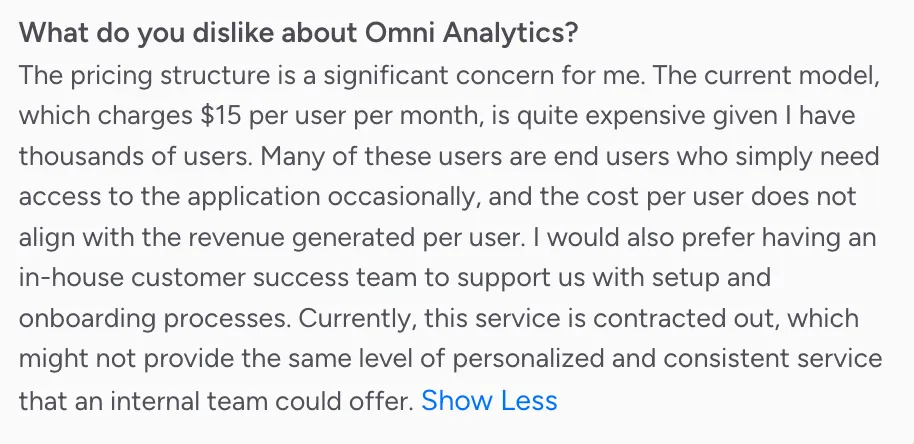
Omni is a capable tool. The reviews make that clear: users praise its customer support, intuitive UI, and the elegance of combining a governed semantic layer with ad hoc SQL. But recurring complaints reveal real friction, especially for teams building analytics into products rather than internal dashboards.
Here's what keeps coming up:
Steep learning curve around topics and the semantic layer
Setting up Omni's topic model takes meaningful time and expertise. Users consistently flag that onboarding, especially for non-technical team members, is harder than expected. Documentation sometimes lags behind new releases, which makes self-directed setup even slower.
Missing features and product immaturity
Omni is a relatively young product, and reviewers are candid about it. Notifications, better report organization, and more polished chart types are recurring feature requests. As one G2 reviewer noted, it "doesn't yet match the feature set of some of the more established tools." The pace of releases is promising, but the gaps are real today.
Dashboard instability on complex models
Performance depends heavily on how well the underlying data model is built, and large or intricate models can slow dashboards down. That is a real burden for teams without dedicated BI engineers, and it is worth load-testing your own model during a trial rather than relying on a demo dataset.
Chart customization requires JSON wrangling
Omni's charts use Vega-Lite under the hood. Going beyond the out-of-the-box options means editing JSON configuration by trial and error. Native visualizations like KPI tiles feel polished, but the inconsistency in chart quality is a genuine usability issue.
Embedded analytics is now a real Omni product, so evaluate the implementation details
Omni's current embedded product is more capable than older comparisons suggest. It supports external embedding with row-level permissions and SSO, Create Mode for users who need to create and navigate content, custom themes and vanity domains. Omni also markets AI-powered customer-facing analytics directly.
That changes the buyer's question. Instead of eliminating Omni because "it was built for internal BI," compare the details that affect your product in production:
- How much semantic modeling is required before your first customer-facing use case is useful?
- Can one analytics definition serve hundreds or thousands of tenants without dashboard duplication?
- How does your team map application users, roles and tenant context into the analytics layer?
- Can customers safely create and share their own content?
- How much of your product's design system can the analytics experience inherit?
- What is the pricing unit at your expected external-user volume?
- How do AI answers inherit the same metrics, permissions and tenant boundaries as dashboards?
For a deeper explanation of why these questions differ from internal BI procurement, see embedded analytics vs. BI tools.
How much does Omni Analytics cost?
As of September 2, 2026, we couldn't verify a stable public pricing grid for Omni. Plans are sales-led, with cost quoted per deployment based on users, use case and scale, which makes it difficult to model how costs will grow as an embedded user base expands. We're deliberately not publishing a number here, because any figure floating around review sites is somebody's negotiated deal rather than a list price.
For teams that need stakeholder buy-in early, or simply want to compare total cost of ownership across vendors, this is real friction. Several alternatives on this list, including Luzmo, Metabase and Holistics, publish their pricing publicly, and Luzmo prices a platform fee plus adoption-based usage rather than provisioned seats. If transparent, publicly listed embedded pricing is a hard requirement for your evaluation, that alone narrows the field considerably.
Compare total cost, not just the platform quote
A useful Omni-versus-alternative pricing comparison needs more than a starting subscription. Ask every vendor to price the same production scenario and break the quote into these components:
| Cost component | What to verify |
|---|---|
| Platform fee | Fixed annual or monthly commitment before usage |
| Creator / admin access | How analysts, builders and administrators are licensed |
| External users | Seats, monthly active users, customers, sessions, loads or another unit |
| Embedded analytics | Included in the base plan or sold as an add-on |
| AI usage | Included allowance, credits, queries, tokens or separate overage |
| SSO and security | Whether enterprise identity/security controls change the plan |
| Deployment | Managed cloud, dedicated environment, VPC or self-hosted cost |
| Implementation | Professional services, onboarding and migration work |
| Support / SLA | Standard support versus paid enterprise response times |
| Overage | What happens when usage exceeds the contracted tier |
Luzmo publishes a single starting price and scales usage with customer adoption, measured through monthly active users, AI conversations or both. That does not make it automatically cheaper than Omni, but it does make an early-stage budget model possible before a sales process. See Luzmo pricing for the current plan structure.
For Power BI, keep internal licensing and customer-facing embedding separate: production embedding requires capacity rather than a simple per-viewer license. For Hex, core editor pricing is public, while signed embedded analytics is an Enterprise add-on. ThoughtSpot publishes entry pricing for several plans, while larger embedded deployments use flexible enterprise pricing.
How we evaluated these alternatives
We compared these ten platforms on the dimensions that separate modern BI and embedded analytics products in practice, rather than counting generic dashboard features:
- Semantic governance. How metrics, dimensions, joins and business definitions are defined and reused across dashboards, self-service and AI.
- Embedding model. Whether customer-facing analytics is supported through iframe delivery, web components, SDKs, APIs or composable/headless approaches.
- Multi-tenant security. How a product maps users and tenants to the right data without duplicating content for every customer.
- End-user self-service. Whether customers can filter, explore, save, create and share their own analytics within defined guardrails.
- AI capabilities. Whether natural-language or agentic analytics uses governed business context and respects the same permissions as the rest of the product.
- Pricing model and transparency. Whether costs can be modeled before sales and how the platform scales with analysts, external users or usage.
- Deployment. Managed cloud, dedicated environments, self-hosted options and data-residency controls.
- Implementation model. How much modeling, frontend work and analytics engineering is required to reach production.
Research date. Product, deployment and pricing facts were re-checked against current vendor documentation on September 21, 2026. Packaging changes frequently, especially for AI and embedded analytics, so verify the final quote and contract terms during procurement.
Our bias, stated plainly. Luzmo competes directly with Omni in embedded analytics, so we're not a neutral referee and you should read our recommendation with that in mind. What we've tried to do is keep the claim narrow, saying clearly where ThoughtSpot, Looker, Sigma, Power BI, Metabase, GoodData.AI, Hex, Holistics or Sisense is the better answer. Where Omni has genuinely improved, like its embedded investment after the Explo acquisition, we've said so rather than leaving a stale criticism in place. We recommend Luzmo narrowly for customer-facing analytics inside SaaS products; we do not claim it is the best replacement for Omni's internal analyst workflows, notebook-style data work or every enterprise BI environment.
Best alternatives to Omni Analytics
1. Luzmo: best overall Omni alternative for embedded analytics
If you're building analytics into your product, not alongside it, Luzmo is the strongest alternative to Omni.
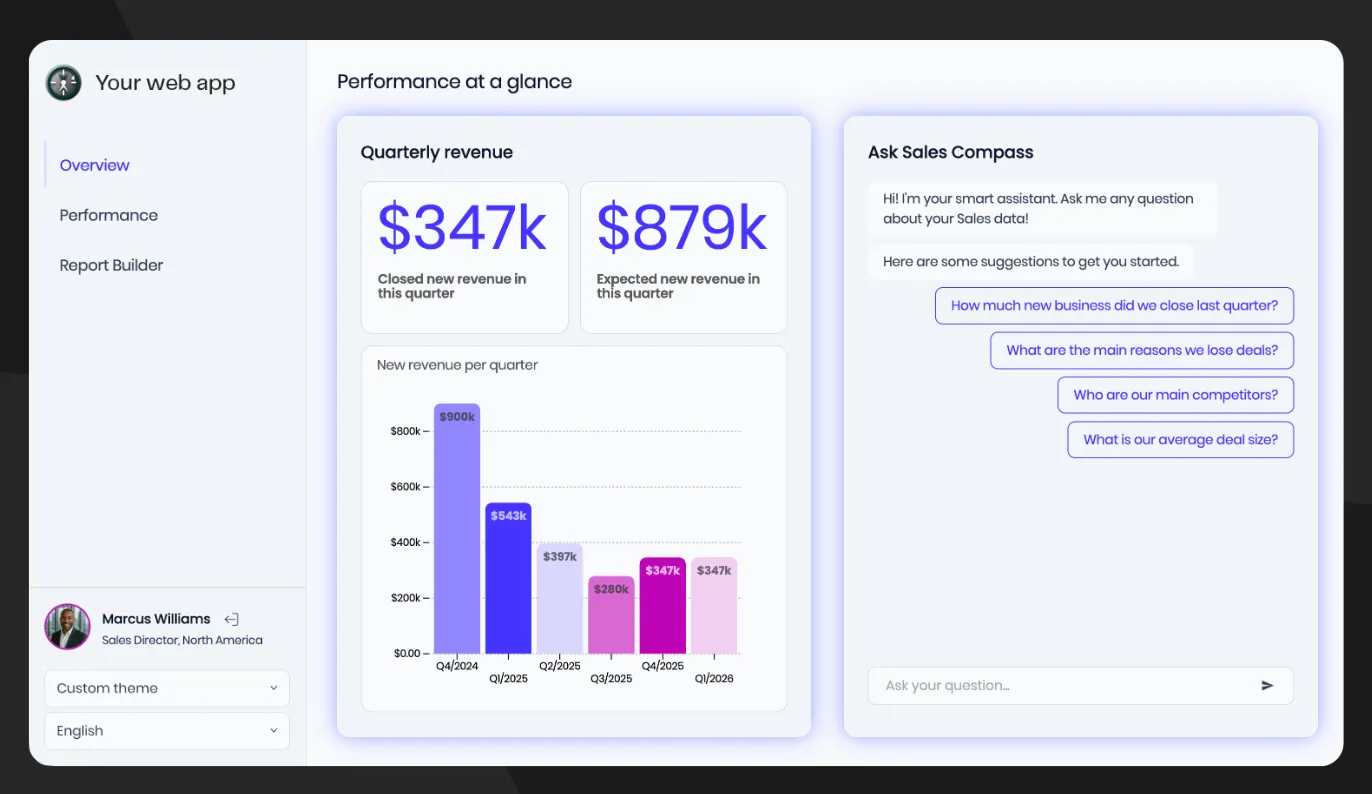
Omni now treats embedded analytics as a first-class product use case alongside internal BI. That makes the comparison less about whether Omni can embed and more about product focus: Omni aims to unify governed internal analytics, AI and customer-facing analytics on one semantic foundation, while Luzmo focuses more narrowly on analytics shipped inside software products. The right choice depends on whether you want one BI platform for multiple audiences or a platform optimized specifically for customer-facing product analytics.
If you need a full feature-by-feature Luzmo vs. Omni comparison, use the dedicated Luzmo vs. Omni page. This article stays focused on the wider market so the two URLs do not target the same search intent.
Built for embedding, not adapted to it
Luzmo's embedded analytics platform gives product teams a no-code dashboard builder that drops directly into any application. Luzmo no longer positions speed as the absence of governance. Product teams can start with embedded dashboards without standing up a separate BI modeling stack, while governed metric definitions can live in Luzmo's semantic layer and be reused across dashboards, APIs and AI answers. That gives teams a path from fast implementation to consistent metrics without making semantic modeling the prerequisite for every first dashboard.
Both platforms now support serious embedded customization, so the difference is no longer "white-label versus no white-label." Omni documents custom themes, CSS/markdown customization and vanity domains for embedded deployments. Luzmo's advantage is the amount of product-facing control available across its embedded stack: white-label themes, CSS injection, responsive dashboards, web components and SDK-based composable experiences are designed to let analytics inherit the surrounding product experience rather than live as a separate reporting destination.
Self-service analytics that scales to your users
Luzmo's self-service analytics layer gives your end users the ability to build, modify, and save their own dashboards, without needing SQL knowledge or analyst support. This is the capability that product teams consistently underestimate: embedding a static dashboard is step one, but giving users the tools to answer their own questions is what drives actual retention and expansion revenue.
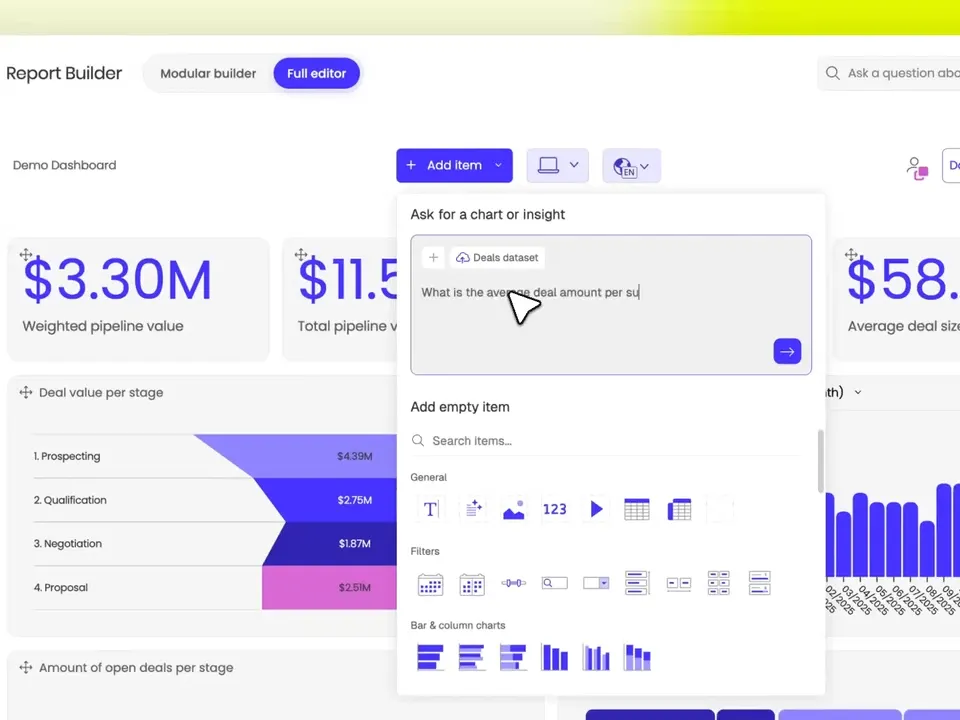
Omni also offers Create Mode for embedded users, allowing customers to create, share and navigate content inside an embedded Omni experience. The practical comparison is therefore not whether end users can create content, but how each product structures that experience. Luzmo focuses its self-service workflows on customer-facing product analytics, with embedded dashboard editing and composable components that product teams can expose selectively to different user types.
Governed metrics without separating the product experience
Luzmo's current semantic-layer approach is designed around embedded, multi-tenant analytics: define a metric once, reuse it across dashboards, API responses and AI answers, and enforce tenant scope through the same runtime. That is different from saying "Luzmo has no semantic layer." The more useful comparison with Omni is where governance lives in the implementation and how much modeling work a product team wants to own before users see value.
Composable analytics for developer teams
For engineering teams that want full control, Luzmo offers composable analytics, a modular approach where analytics UI components are assembled rather than configured inside a monolithic dashboard tool. This matters when your product has opinionated UI patterns, existing design systems, or complex interaction requirements that generic dashboard builders simply can't accommodate.
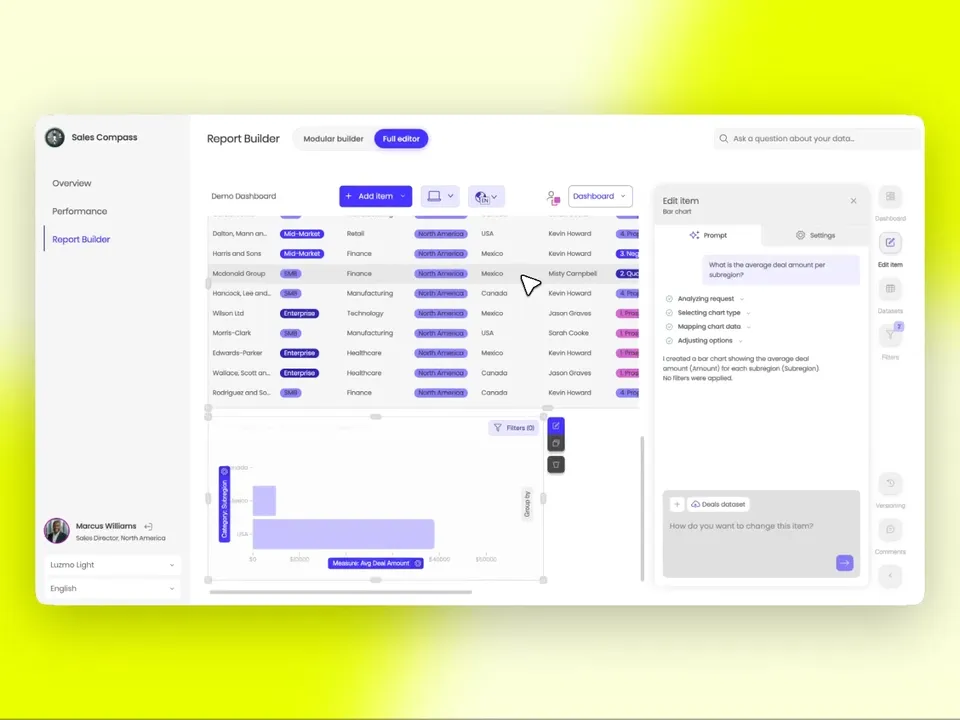
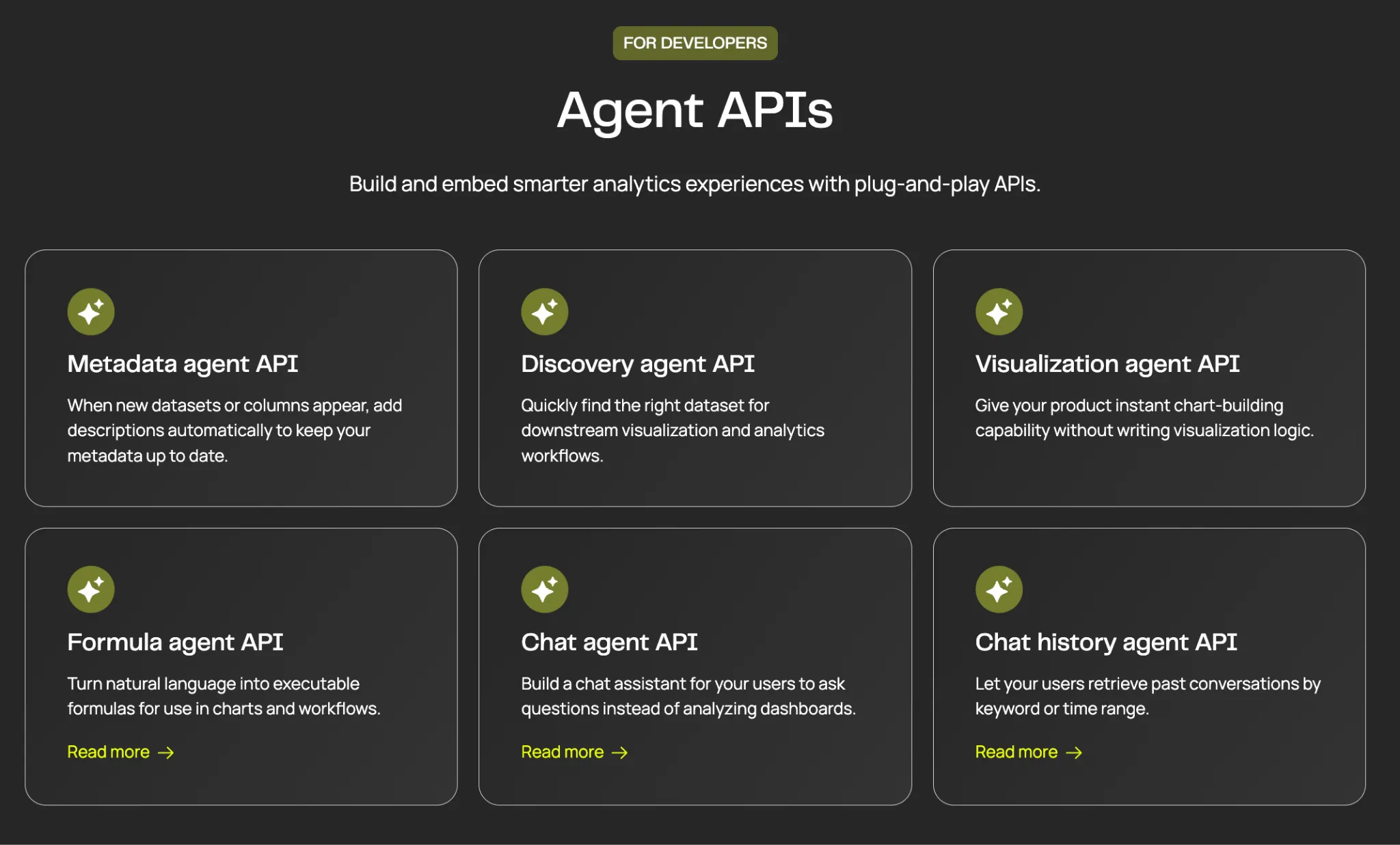
The Flex SDK takes this further: it exposes Luzmo's rendering and data layer as low-code building blocks, giving developers the ability to create fully custom data interactions without rebuilding analytics infrastructure from scratch.
Luzmo AI and Luzmo IQ: analytics that answers questions
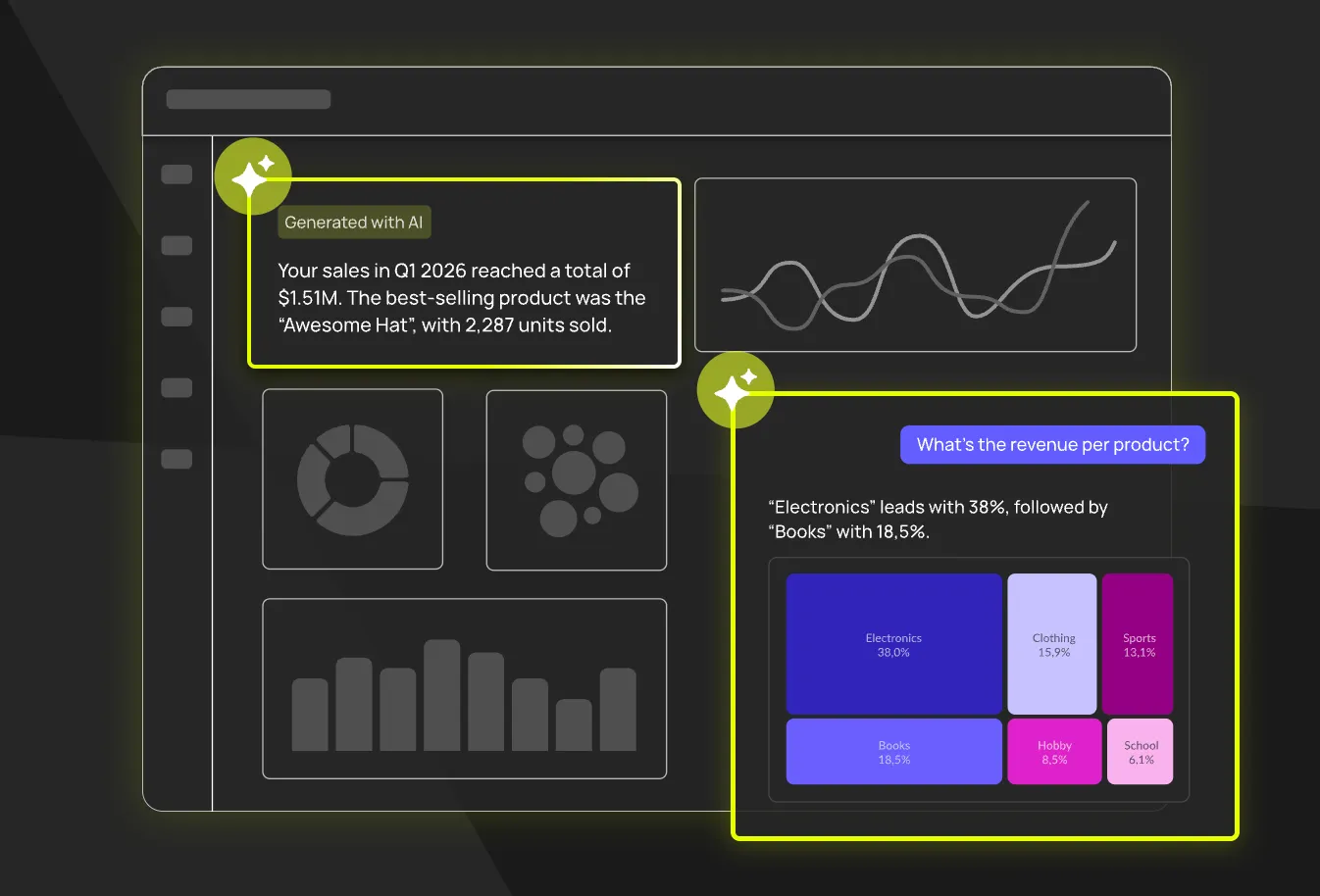
Luzmo's AI capabilities are embedded-first by design. Luzmo AI brings AI-powered insight generation, automated anomaly detection, and natural language querying across all of Luzmo's capabilities, not just as a standalone chat interface, but woven into the dashboard and exploration experience.
The flagship AI feature, Luzmo IQ, is a conversational AI analyst agent that sits inside your product. End users can ask questions in plain language and get accurate, governed answers, without leaving your application, without seeing your data stack, and without requiring any data literacy. Omni's AI is grounded in its semantic model and now spans internal and embedded analytics use cases. Luzmo's differentiation is narrower: its AI experiences are designed to be shipped inside customer-facing software, with tenant-aware answers and product-level embedding as part of the same analytics stack.
Transparent pricing built for embedded scale
Omni's pricing is entirely sales-led, with no public plans. Luzmo starts at €1,995 per month, billed annually, combining a platform fee with adoption-based usage measured through monthly active users, AI conversations or both. Plans are structured around the analytics solutions you put in front of users plus monthly-active-user bands. Always check the live pricing page before publishing exact numbers because packaging can change.
Best for: SaaS and software product teams whose primary requirement is customer-facing analytics, especially when multi-tenancy, product-native UX, self-service and predictable external-user scaling matter more than replacing a full internal BI workspace.
2. ThoughtSpot: best for AI-led search and natural-language analytics
ThoughtSpot is one of the most direct modern alternatives to Omni because both platforms now compete on a similar promise: governed analytics that business users can access through AI and natural language, not just static dashboards. ThoughtSpot's center of gravity is its search and agent experience, with Spotter positioned as an analytics agent that can answer questions, investigate patterns and generate analytical outputs against governed data.
ThoughtSpot also has a dedicated embedded product rather than treating external delivery as simple dashboard sharing. Its current embedded offering includes APIs and SDKs, multi-tenant capabilities and AI-driven analytics designed to live inside another application. That makes it relevant for both internal analytics teams and software companies evaluating customer-facing AI analytics.
Where ThoughtSpot differs from Omni is interaction style. Omni combines a semantic model with SQL, point-and-click analysis, spreadsheets, dashboards and AI inside one BI environment. ThoughtSpot puts more emphasis on search, natural-language exploration and agentic workflows as the front door to analytics. Teams whose users want to "ask the data" before they want to build workbooks may prefer that model.
Pricing is more transparent than many enterprise BI vendors at the entry level: ThoughtSpot publishes starting prices for several plans and a free developer option, while large embedded deployments use flexible enterprise pricing. Model the real deployment rather than assuming the public per-user number is the embedded production price.
For a deeper comparison of this category, see our ThoughtSpot alternatives guide.
Omni vs ThoughtSpot: choose Omni when you want SQL, modeling, dashboards and AI to share one governed BI workflow. Choose ThoughtSpot when search and agent-led exploration are the primary experience you want business users or customers to adopt.
Best for: organizations prioritizing AI search, natural-language analytics and governed self-service, including teams that want to embed that interaction model into another product.
3. Looker
Looker is the platform that Omni was explicitly designed to improve on. The Omni founding team came from Looker, and the products share DNA in their semantic layer approach. Looker remains the most mature LookML-based analytics platform available, with deep integration across the Google Cloud ecosystem (BigQuery, Vertex AI, Dataplex).
For enterprise teams already standardized on Google Cloud, Looker's semantic layer is genuinely powerful: centralized metric definitions, version-controlled data models, and robust governance. Embedded analytics is supported through Looker's Embed SDK and iFrame approach, and it can be made to work well, but it requires LookML expertise and careful administration. Looker has also added Gemini-powered conversational analytics and a Conversational Analytics API, so AI is no longer a gap.
The trade-offs are structural rather than flaws. Looker is quote-based and sales-led at every edition, so it is harder to budget than a published flat rate, and its LookML modelling layer is the source of both its governance strength and its onboarding effort: someone has to build and maintain the semantic model. Our Looker pricing guide sets out what drives the cost. It's also explicitly designed around internal BI use cases; customer-facing embedded analytics is achievable but not the primary design orientation.
Omni vs Looker: both are semantic-layer-centric BI platforms and the comparison is unusually direct because Omni's founders came from Looker. Choose Looker when LookML is already institutionalized, Google Cloud integration is strategically important and your organization values a mature governance model. Choose Omni when you want a newer semantic workflow that combines modeled data with spreadsheet, SQL and AI interaction in the same environment.
Best for: enterprise teams with in-house LookML skills, a Google Cloud center of gravity, and the resources to invest in platform administration.
4. Sigma Computing
Sigma Computing occupies an interesting niche: it's a cloud warehouse analytics tool built around a spreadsheet-style interface. Users interact with live data from Snowflake, BigQuery, or Redshift using formulas and pivot-table logic that feels familiar to anyone coming from Excel. The result is a tool that data analysts love: the analytical power of a cloud warehouse without having to learn SQL from scratch.
Sigma's embedding capabilities exist but are positioned as an add-on rather than a core product pillar. Its licensing is oriented around creators and analysts, so if you plan to embed at viewer scale it's worth confirming current pricing directly. Costs can add up, and the embedding experience is geared toward analysts sharing dashboards rather than product teams delivering customer-facing analytics at scale.
Where Sigma excels is in live, exploratory analysis on large datasets. If your team lives in spreadsheets and needs direct warehouse access with a familiar interface, Sigma is genuinely excellent. If you need to embed that analysis into a multi-tenant SaaS product at viewer scale, it becomes a more complex and expensive proposition.
Omni vs Sigma: choose Omni when a centralized semantic model and governed AI are the core requirement. Choose Sigma when business users already think in spreadsheets and direct interaction with warehouse data is the adoption path. The products can both serve modern warehouse teams, but they make self-service feel very different.
Best for: data-heavy analytics teams who are comfortable in spreadsheets and need live warehouse querying. Less suited for customer-facing embedded analytics products.
5. Microsoft Power BI: best for Microsoft and Fabric environments
Power BI is impossible to ignore in an Omni alternatives article because many enterprise evaluations are constrained by ecosystem before they are constrained by features. If a company already runs Microsoft 365, Azure, Entra ID and Fabric, Power BI may be the organizational default even when a newer BI platform has a cleaner standalone experience.
Power BI combines dashboards, semantic models, self-service analysis and a broad Microsoft data ecosystem. For customer-facing analytics, however, evaluate Power BI Embedded as its own deployment and cost model. Microsoft documents production embedding through paid capacity; external app users do not necessarily need individual Power BI licenses in the app-owns-data model, but the organization must buy the appropriate capacity.
That distinction matters when comparing it with Omni. An internal Power BI license comparison does not tell you what a customer-facing SaaS rollout will cost or how it will operate. Model the Azure/Fabric capacity, expected concurrency, authentication flow, development work and any AI requirements separately.
Power BI is strongest when the surrounding Microsoft stack is itself a requirement. It is less compelling as a greenfield choice when your main goal is simply to ship a native-feeling analytics feature inside a SaaS product and you do not otherwise need the Microsoft BI ecosystem.
For a deeper breakdown, see our Power BI alternatives guide.
Omni vs Power BI: choose Power BI when Microsoft integration, Fabric and enterprise standardization outweigh tool-switching costs. Choose Omni when you want a warehouse-centric modern BI environment with a unified semantic/AI workflow and do not need Microsoft to be the center of the analytics stack.
Best for: enterprises already standardized on Microsoft 365, Azure and Fabric, especially when BI procurement is part of a wider Microsoft platform strategy.
6. Metabase
Metabase is one of the most widely deployed BI tools in the world, largely because its open-source version is free. The interface is genuinely beginner-friendly: you can connect a database and build a dashboard in under an hour without writing SQL. Non-technical users can query data using a point-and-click question builder, and the charting options cover most standard business intelligence needs.
For embedding, Metabase offers two modes: signed embeds (for public or semi-public content) and full-app embedding (for authenticated, multi-user product analytics). The latter is limited to Pro and Enterprise plans. Multi-tenant implementations are possible but require careful permissions architecture and more engineering work than purpose-built platforms.
The open-source foundation is both Metabase's biggest selling point and its main limitation. You can self-host for free, but product-grade embedded analytics, with SSO, row-level security, white-labeling and tenant isolation, still requires significant engineering investment on top of the base product. Teams that start from the self-hosting requirement rather than the vendor usually end up comparing self-hosted Metabase alternatives against managed platforms on total engineering cost, not license cost.
Omni vs Metabase: choose Metabase when low cost, open source and straightforward internal dashboards are the priority. Choose Omni when governed semantic modeling, enterprise AI and a more integrated modern BI workflow justify a commercial platform. For customer-facing analytics, compare the paid embedded tiers and implementation effort rather than assuming Metabase Open Source covers the production use case.
Best for: teams with limited budgets who need basic internal BI, developers who want to self-host and extend an open-source platform, and organizations that don't require sophisticated multi-tenancy.
7. GoodData.AI
GoodData.AI (formerly GoodData) rebranded in April 2026 as it shifted its positioning toward AI-native decision intelligence, but embedded analytics remains part of the platform. It supports React SDK, Web Components and iframe embedding, plus a governed semantic foundation and cloud or self-hosted deployment. That combination keeps it relevant for regulated enterprises and software companies that need tighter control over where analytics runs. Its multi-tenant architecture supports complex enterprise deployments, and its governance and security features (RBAC, row-level security, data access policies) are genuinely enterprise-grade.
GoodData.AI supports iframe embedding, Web Components and a React SDK, and its embedded offering covers white-labeling, multitenancy and role-based access controls. Deployment runs either managed cloud or self-hosted, which matters for regulated industries or companies with strict data residency requirements. Pricing on the public page is structured as a platform fee plus per-workspace pricing with unlimited users and data, and the actual figure is quote-based, so compare architecture and total deployment cost rather than a headline rate.
The analytics modeling layer is powerful but carries complexity. Implementation typically requires a dedicated data engineering engagement, and time-to-value is measured in weeks rather than days. If a composable, warehouse-adjacent semantic layer is the part you actually care about, it's worth reviewing GoodData alternatives with a composable semantic layer side by side, since that architecture choice tends to outlast the dashboard layer built on top of it.
GoodData.AI is a strong choice for enterprises that need deployment flexibility, advanced governance, and are willing to invest in a substantial implementation project. For SaaS teams who need to move quickly, the overhead may be prohibitive.
Omni vs GoodData.AI: both can combine governed semantics, AI and embedded delivery. GoodData.AI stands out when deployment flexibility, self-hosting or enterprise architecture controls dominate the decision. Omni is the cleaner comparison when the goal is one managed analytics workspace spanning internal BI and customer-facing use cases.
Best for: large enterprises in regulated industries, organizations with strict data residency or deployment requirements, and teams with dedicated BI engineering capacity.
8. Hex: best for notebook-to-data-app analytics workflows
Hex is a different kind of Omni alternative. It grew from collaborative notebooks and data science workflows rather than classic dashboard BI, then expanded into no-code exploration, AI agents, semantic models, published data apps and embedded analytics. That makes it especially relevant for teams whose analysts regularly move between SQL, Python, exploratory work and polished applications.
Hex now supports native semantic modeling as well as syncing external semantic definitions from systems such as dbt MetricFlow, Cube and Snowflake Semantic Views. Its signed embedding product can securely place Hex apps inside customer-facing software using pass-through authentication and optional row-level security. Signed embedding is currently an Enterprise add-on rather than a standard feature on lower plans.
The trade-off is audience. Hex is compelling when the people producing analytics are technical and want notebook-level flexibility, and when the output is a data app rather than a traditional BI dashboard catalog. If your main requirement is governed dashboards and self-service for thousands of non-technical external users, test that workflow carefully rather than choosing Hex for its analyst experience alone.
Core Hex pricing is public, while Enterprise and embedded analytics require a sales conversation. Treat AI credits and any advanced compute as separate cost variables in a production comparison.
Omni vs Hex: choose Hex when notebooks, SQL/Python workflows, agent-assisted analysis and published data apps are central to how your data team works. Choose Omni when a governed semantic BI environment and broad dashboard/self-service workflows are the primary operating model.
Best for: technical analytics teams that want to turn notebook-style analysis into collaborative data apps and selectively embed those apps for external users.
9. Holistics BI
Holistics takes a code-first approach to analytics: the semantic layer is defined in a modeling language rather than a GUI, making it appealing to data engineering teams who are comfortable with version-controlled, code-based workflows. It integrates cleanly with dbt and supports standard SQL without requiring a proprietary modeling language.
Transparent pricing is a genuine differentiator, with one caveat. Holistics publishes its internal BI plans publicly, starting with a platform fee plus per-user licensing, which makes total cost far easier to evaluate without a sales conversation. Embedded pricing is a separate, custom conversation though, so don't assume the public numbers cover a customer-facing deployment.
The embedding story is functional but lighter than a dedicated platform's, and it isn't positioned as a full embedded analytics product. For teams that primarily need BI with some external sharing capability, it works well. For SaaS teams building customer-facing analytics as a core product feature, the toolset is limiting. Our roundup of Holistics alternatives for code-first teams goes deeper if the modeling-in-code approach is what appeals to you.
Omni vs Holistics: choose Holistics when analytics-as-code, Git workflows and transparent internal-BI pricing are more important than a broad end-user product experience. Choose Omni when you want a more integrated interface for governed modeling, business-user exploration and AI in one platform.
Best for: SQL-first data engineering teams who want transparent pricing and code-based semantic modeling, and organizations with lighter embedding requirements.
10. Sisense
Sisense has repositioned itself around embedded analytics and its Compose SDK, a component-based embedding approach that gives frontend developers significant control over how analytics elements are rendered inside applications. This is different from iframe-based embedding: individual charts, filters, and KPIs can be embedded as independent components and integrated into a product's existing UI rather than delivered as a standalone dashboard.
Compose SDK isn't React-only either: it supports React, Angular and Vue with TypeScript, which matters if your frontend isn't on the default stack. The platform has strong governance, row-level security and a mature feature set built up over years of enterprise deployments, plus cloud, dedicated and on-premises deployment options with white-labeling, SSO and multitenancy. Sisense's Fusion product also includes AI-powered analytics capabilities.
The main friction points are plan structure and pricing. Sisense offers self-service and enterprise plans, with enterprise pricing supplied through sales rather than a public numeric grid, so cost comparisons need a quote rather than a list price. Implementation complexity is also higher than lighter-weight alternatives. Teams that get this far usually care most about frontend control, which is the same reason they end up comparing purpose-built Embeddable alternatives that expose components rather than dashboards.
Omni vs Sisense: choose Sisense when enterprise embedding routes and frontend/component integration are the center of the project. Choose Omni when the semantic model and unified internal-plus-external analytics workflow are the main reasons for buying the platform.
Best for: developer-led teams that want component-level embedding control, and organizations with existing Sisense relationships or deep front-end customization needs.
Omni vs the main alternatives
Searchers comparing Omni usually have a smaller shortlist than ten tools. This is the simplest way to frame the closest matchups:
| Comparison | Choose Omni when... | Choose the alternative when... |
|---|---|---|
| Omni vs Luzmo | You want one governed platform spanning internal BI, AI and customer-facing analytics | Customer-facing analytics inside your software product is the primary job |
| Omni vs ThoughtSpot | You want modeling, SQL, dashboards, spreadsheets and AI in one BI workflow | Search and agent-led natural-language analytics should be the main user experience |
| Omni vs Looker | You want a newer semantic BI workflow with multiple analysis interfaces | Your company is deeply standardized on LookML and Google Cloud governance |
| Omni vs Sigma | Central semantic governance and governed AI come first | Spreadsheet-style warehouse exploration is how business users work |
| Omni vs Power BI | You want a modern warehouse-centric BI stack outside the Microsoft ecosystem | Microsoft 365, Azure and Fabric standardization drives the platform decision |
| Omni vs Metabase | You need semantic governance, enterprise AI and a commercial managed platform | Open source, low cost and simple internal dashboards matter more |
| Omni vs Hex | You want a BI workspace centered on governed metrics and broad self-service | Notebook, SQL/Python and data-app workflows are central to the analytics team |
For the direct Luzmo matchup, detailed feature comparisons live on the dedicated Luzmo vs. Omni page rather than being duplicated here.
When Omni is actually the better choice
An alternatives article is only useful if it also tells you when not to switch. Omni is likely to remain the stronger choice when several of these are true:
- You want one governed semantic layer to serve internal dashboards, analyst exploration, AI and customer-facing analytics.
- Your data team wants to combine SQL, point-and-click analysis, spreadsheet-style interaction and AI instead of standardizing on one interaction model.
- You already invested in Omni topics, models, permissions, dashboards and workflows, and the replacement does not remove enough ongoing work to justify migration.
- Your customers need embedded Create Mode, not only fixed dashboards, and Omni's entity/content-permission model maps cleanly to your product.
- You value a managed platform and frequent product releases more than public list pricing.
- The same data team owns both internal BI and external analytics and wants to minimize duplicated metric logic across two platforms.
The case for an alternative gets stronger when your constraint is more specific: customer-facing UX and external-user economics (Luzmo), AI search (ThoughtSpot), spreadsheet adoption (Sigma), Microsoft standardization (Power BI), open source (Metabase), self-hosted governance (GoodData.AI), notebook/data-app workflows (Hex), analytics-as-code (Holistics) or component-level enterprise embedding (Sisense).
Best Omni alternative by architecture
Feature lists converge quickly. Architecture and operating model are harder to change, so classify the shortlist before comparing edge-case features.
- Unified governed BI + embedded analytics: Omni, Looker and GoodData.AI put a semantic/governance layer at the center and can serve more than one audience. Choose this model when a shared definition of metrics matters more than minimizing setup.
- Customer-facing product analytics: Luzmo is optimized around analytics shipped inside another software product, including multi-tenant delivery, white-label UX, self-service and composable components.
- AI/search-led analytics: ThoughtSpot makes natural-language search and agents the primary interaction pattern rather than a secondary dashboard feature.
- Spreadsheet/warehouse analytics: Sigma gives business users a familiar spreadsheet-style surface over cloud warehouse data.
- Microsoft ecosystem BI: Power BI is strongest when Fabric, Azure, Entra ID and Microsoft 365 are already strategic dependencies.
- Notebook and data-app analytics: Hex combines SQL/Python notebooks, AI and publishable apps for teams whose analysis is more technical than conventional dashboard BI.
- Analytics-as-code: Holistics prioritizes version-controlled modeling and data-team workflows.
- Open-source internal BI: Metabase minimizes license cost but shifts more operational responsibility to your team.
- Enterprise component embedding: Sisense is a fit when frontend integration and multiple embedding routes are core requirements.
- Headless semantic layers: the metrics layer is decoupled from any UI and you build the frontend. Maximum control, most engineering. Compare the Cube alternatives for a headless semantic layer before committing, because the build burden is easy to underestimate.
One distinction is worth calling out separately, because teams conflate it constantly: customer-facing analytics is not the same problem as internal operational tooling. If what you actually need is a fast admin panel or an internal CRUD interface over your database, an analytics platform is the wrong shape of tool entirely, and the Basedash alternatives for internal tools are a better place to start.
If you are specifically choosing a platform to place analytics in front of external customers, compare these architecture choices with our embedded analytics tools roundup rather than using an internal-BI checklist.
How to choose the right Omni alternative
Start with the user and operating model, not the chart library:
- Building customer-facing analytics as a core SaaS feature? Start with Luzmo.
- Want AI search and agent-led analytics to be the main interaction? Test ThoughtSpot.
- Need mature governed BI in Google Cloud? Shortlist Looker.
- Your business users work like spreadsheet power users? Test Sigma Computing.
- Deep Microsoft/Fabric commitment? Keep Power BI on the shortlist.
- Need free or open-source internal BI? Start with Metabase.
- Need governed analytics plus self-hosted deployment flexibility? Evaluate GoodData.AI.
- Your analysts mix SQL, Python, AI and data apps? Test Hex.
- Want code-first, Git-managed semantic BI? Evaluate Holistics.
- Need enterprise component-level embedding? Evaluate Sisense.
- Need one platform to cover internal BI, AI and embedded analytics on a shared semantic foundation? Omni may still be the best fit, and switching solely for feature parity may not be worth the migration cost.
For customer-facing use cases, also evaluate self-service analytics, multi-tenant analytics patterns and composable analytics separately. Those implementation details often matter more than the vendor's generic BI feature count.
What to consider before migrating away from Omni
Replacing a BI platform is not a dashboard-copying exercise. The expensive part is usually recreating business logic, permissions and user workflows without changing the meaning of the numbers.
Before signing with an alternative, inventory these parts of the current Omni deployment:
1. Semantic definitions and topics
List the measures, dimensions, joins, topics and reusable business definitions that production content depends on. Decide which definitions should migrate as-is and which are being replaced because the migration is also a modeling cleanup.
2. Dashboards, workbooks and actual usage
Do not migrate every object just because it exists. Use activity data to identify what customers and employees actually open, which filters they use and which dashboards can be retired. Migrations are cheaper when they remove dead content instead of reproducing it.
3. Custom visualizations and Vega-Lite logic
Flag dashboards that rely on advanced visualization configuration or custom Vega-Lite behavior. Rebuilding the same output in another vendor may require a different charting model or frontend component.
4. Row-level security, user attributes and tenant mapping
Document how application users map to connections, roles, attributes, entities and data scopes. Reproduce this security model in a proof of concept before migrating visual content. A dashboard that looks identical but exposes the wrong tenant data is a failed migration. For a product-oriented example of serving many customers from shared analytics definitions, see our multi-tenant embedded analytics examples.
5. Embedded authentication and application integration
Inventory SSO/session generation, embed URLs, events, links, custom domains, themes and any frontend code that assumes Omni-specific behavior. The replacement needs to fit the surrounding product, not just render the same charts.
6. End-user created content
If customers use Omni Create Mode, decide what happens to their saved content, folders and sharing relationships. This is easy to miss because migration projects often focus only on centrally managed dashboards.
7. AI and semantic context
List the business context that makes AI answers reliable: metric definitions, descriptions, permissions and curated knowledge. Moving to another AI analytics product without migrating that context can make answers look more impressive while becoming less trustworthy.
8. Pricing at the post-migration scale
Model the replacement using expected production usage after migration, not today's test users. Include creators, external users, AI usage, embedding add-ons, support, implementation and overages.
A practical migration sequence
- Freeze the evaluation dataset and choose 3 to 5 representative production use cases.
- Rebuild the semantic/security foundation first.
- Recreate one simple dashboard and one difficult dashboard.
- Test a real external tenant and permission boundary.
- Test end-user self-service and AI on the same governed metrics.
- Compare performance and cost at expected concurrency.
- Migrate high-usage content first; retire low-usage content rather than porting it.
- Run old and new analytics in parallel for a validation period before final cutover.
If the trigger for migration is the Explo acquisition rather than dissatisfaction with Omni itself, compare the cost of moving to Omni with the cost of moving elsewhere. A forced transition is still a chance to re-evaluate the target architecture, but it does not automatically mean a second migration is worth it.
Compare governed and AI analytics platforms
Omni sits between governed BI, semantic modeling and newer AI-driven analytics workflows. Compare it with:
If your priority is customer-facing analytics rather than internal BI, explore Luzmo.
The bottom line
Omni is a stronger and broader analytics platform in 2026 than older "Omni alternatives" articles suggest. It now competes across governed BI, AI and customer-facing analytics, with a semantic layer connecting those use cases. That makes it a real finalist, not a straw man to eliminate before the comparison starts.
The reason to choose an alternative is therefore fit, not a generic claim that Omni lacks embedding or self-service.
Choose ThoughtSpot when AI search is the product experience, Looker for mature Google Cloud semantic BI, Sigma for spreadsheet-driven warehouse analysis (our Sigma Computing pricing guide covers its licence and credit model), Power BI for Microsoft-centered enterprises, Metabase for open-source internal BI, GoodData.AI for governed deployment flexibility, Hex for notebook-to-data-app workflows, Holistics for analytics-as-code and Sisense for enterprise component embedding.
Choose Luzmo when the analytics itself is a customer-facing feature inside your software product and you want the platform, pricing and implementation model to be organized around that external-user experience. Luzmo combines embedded analytics, self-service analytics, a semantic layer for embedded AI, composable analytics and Luzmo AI in the same product stack.
For a direct feature-by-feature comparison, see Luzmo vs. Omni. For the wider market, keep using this guide as the shortlist.
→ Start a free trial to test an embedded dashboard against your own data.
FAQ
All your questions answered.
What is Omni Analytics?
Omni Analytics is a business intelligence platform founded by former Looker leaders. It combines a governed semantic model with SQL-first ad hoc exploration, and it now markets embedded analytics alongside internal BI, with embedded components that include iframes and KPI tiles.
Did Omni acquire Explo?
Yes. Omni announced its acquisition of Explo on October 22, 2025, and Explo became a wholly owned subsidiary. Omni's transition FAQ says Explo remains fully operational while the majority of customers are migrated to Omni over a roughly 12-month transition, ahead of Explo's planned sunset. Existing pricing is held through each customer's current contract, and Omni has not published one exact shutdown date that applies to everyone.
Is Omni good for embedded analytics?
Yes. Omni now has a substantive customer-facing analytics offering with external embedding, row-level permissions, SSO, Create Mode for embedded users, theming and vanity domains. The decision is less about whether Omni can embed and more about whether its unified governed BI model fits your product better than a platform focused specifically on customer-facing analytics.
How much does Omni Analytics cost?
Omni does not publish a stable public pricing grid that we could verify as of September 2, 2026. Treat any third-party numeric figure as anecdotal unless Omni confirms it for your deployment. Ask for a quote that separates creator and admin access, external users, embedded use, AI usage, support and any implementation costs so you can compare total cost with alternatives on the same scenario.
What is the best Omni Analytics alternative for embedded analytics?
For customer-facing analytics inside a SaaS product, Luzmo is a focused alternative because embedded delivery, multi-tenancy, self-service, white-labeling and external-user usage are core to its product and pricing model. GoodData.AI and Sisense are also strong embedded options for enterprise requirements, while Omni itself remains a credible choice when the same semantic platform also needs to serve internal BI.
Which Omni alternative is open source?
Metabase. Its open-source edition is free to self-host and covers standard internal BI needs. Product-grade embedding features like SSO, row-level security and white-labeling sit in the paid Pro and Enterprise tiers, so free doesn't mean free for customer-facing analytics in a SaaS product.
What are the closest competitors to Omni Analytics?
The closest Omni competitors depend on the use case. Looker is the most direct semantic-governance comparison, Sigma is a strong warehouse and spreadsheet alternative, ThoughtSpot competes on AI-led analytics, Power BI on enterprise ecosystem breadth, and Metabase on low-cost open-source BI. For customer-facing embedded analytics, Luzmo, GoodData.AI and Sisense are more specialized comparisons.
Is ThoughtSpot an alternative to Omni Analytics?
Yes. Both products combine governed data with AI-assisted self-service, but the user experience differs. ThoughtSpot emphasizes natural-language search and agent-led exploration, while Omni combines AI with SQL, spreadsheet, dashboard and semantic-model workflows. ThoughtSpot is a stronger fit when search and conversational analytics should be the primary interface.
Is Power BI an alternative to Omni Analytics?
Yes, especially in organizations already standardized on Microsoft 365, Azure and Fabric. For customer-facing analytics, compare Power BI Embedded separately from normal internal Power BI licensing because production embedding uses paid capacity and a different authentication and deployment model.
Should I switch from Omni or keep it?
Keep Omni when its shared semantic layer, internal BI, AI and embedded analytics reduce platform sprawl and the existing implementation is working. Consider switching when a more specialized requirement dominates the project, such as customer-facing product analytics, AI-first search, spreadsheet workflows, open source, self-hosting or notebook-style data apps. Include migration cost in the decision, not only feature differences.
What's the difference between Omni and Looker?
Omni was founded by ex-Looker leaders and shares Looker's semantic-layer DNA, but adds more flexible ad hoc SQL exploration and a lighter setup. Looker is more mature, deeply integrated with Google Cloud and stronger on governance, but it's more expensive and administratively heavier.
Written by

Ship the future of your data
Let us show you what Luzmo can do for your product.

Book your session with our analytics expert.